
Preface
Copyright
Copyright 1998-2002, The OpenLDAP Foundation, All Rights Reserved.
Copyright 1992-1996, Regents of the University of Michigan, All Rights Reserved.
This document is considered a part of OpenLDAP Software. This document is subject to terms of conditions set forth in OpenLDAP Software Copyright Notices and the OpenLDAP Public License. Complete copies of the notices and associated license can be found in Appendix B and C, respectively.
Scope of this Document
This document provides a guide for installing OpenLDAP 2.2 Software (http://www.openldap.org/software/) on
This document is meant to be used in conjunction with other OpenLDAP information resources provided with the software package and on the project's extensive site (http://www.OpenLDAP.org/) on the World Wide Web. The site makes available a number of resources.
| Resource | URL |
| Document Catalog | http://www.OpenLDAP.org/doc/ |
| Frequently Asked Questions | http://www.OpenLDAP.org/faq/ |
| Issue Tracking System | http://www.OpenLDAP.org/its/ |
| Mailing Lists | http://www.OpenLDAP.org/lists/ |
| Software Pages | http://www.OpenLDAP.org/software/ |
| Support Pages | http://www.OpenLDAP.org/support/ |
Acknowledgments
The OpenLDAP Project is comprised of a team of volunteers. This document would not be possible without their contribution of time and energy.
The OpenLDAP Project would also like to thank the University of Michigan LDAP for building the foundation of LDAP software and information to which OpenLDAP Software is built upon. This document is based upon U-Mich LDAP document: The SLAPD and SLURPD Administrators Guide.
Amendments
Suggested enhancements and corrections to this document should be submitted using the OpenLDAP
About this document
This document was produced using the Simple Document Format (http://search.cpan.org/src/IANC/sdf-2.001/doc/) documentation system developed by Ian Clatworthy. Tools for SDF are available from CPAN (http://search.cpan.org/search?query=SDF).
1. Introduction to OpenLDAP Directory Services
This document describes how to build, configure, and operate OpenLDAP software to provide directory services. This includes details on how to configure and run the stand-alone
1.1. What is a directory service?
A directory is a specialized database optimized for reading, browsing and searching. Directories tend to contain descriptive, attribute-based information and support sophisticated filtering capabilities. Directories generally do not support complicated transaction or roll-back schemes found in database management systems designed for handling high-volume complex updates. Directory updates are typically simple all-or-nothing changes, if they are allowed at all. Directories are tuned to give quick response to high-volume lookup or search operations. They may have the ability to replicate information widely in order to increase availability and reliability, while reducing response time. When directory information is replicated, temporary inconsistencies between the replicas may be okay, as long as they get in sync eventually.
There are many different ways to provide a directory service. Different methods allow different kinds of information to be stored in the directory, place different requirements on how that information can be referenced, queried and updated, how it is protected from unauthorized access, etc. Some directory services are local, providing service to a restricted context (e.g., the finger service on a single machine). Other services are global, providing service to a much broader context (e.g., the entire Internet). Global services are usually distributed, meaning that the data they contain is spread across many machines, all of which cooperate to provide the directory service. Typically a global service defines a uniform namespace which gives the same view of the data no matter where you are in relation to the data itself. The Internet
1.2. What is LDAP?
What kind of information can be stored in the directory? The LDAP information model is based on entries. An entry is a collection of attributes that has a globally-unique
How is the information arranged? In LDAP, directory entries are arranged in a hierarchical tree-like structure. Traditionally, this structure reflected the geographic and/or organizational boundaries. Entries representing countries appear at the top of the tree. Below them are entries representing states and national organizations. Below them might be entries representing organizational units, people, printers, documents, or just about anything else you can think of. Figure 1.1 shows an example LDAP directory tree using traditional naming.
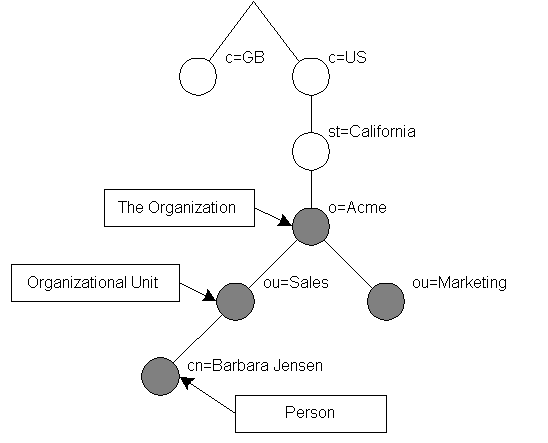
Figure 1.1: LDAP directory tree (traditional naming)
The tree may also be arranged based upon Internet domain names. This naming approach is becoming increasing popular as it allows for directory services to be located using the DNS. Figure 1.2 shows an example LDAP directory tree using domain-based naming.
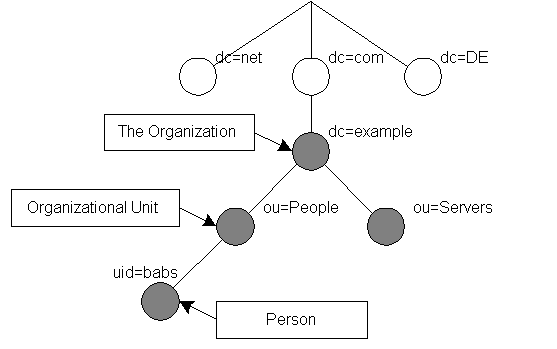
Figure 1.2: LDAP directory tree (Internet naming)
In addition, LDAP allows you to control which attributes are required and allowed in an entry through the use of a special attribute called objectClass. The values of the objectClass attribute determine the schema rules the entry must obey.
How is the information referenced? An entry is referenced by its distinguished name, which is constructed by taking the name of the entry itself (called the
How is the information accessed? LDAP defines operations for interrogating and updating the directory. Operations are provided for adding and deleting an entry from the directory, changing an existing entry, and changing the name of an entry. Most of the time, though, LDAP is used to search for information in the directory. The LDAP search operation allows some portion of the directory to be searched for entries that match some criteria specified by a search filter. Information can be requested from each entry that matches the criteria.
For example, you might want to search the entire directory subtree at and below dc=example,dc=com for people with the name Barbara Jensen, retrieving the email address of each entry found. LDAP lets you do this easily. Or you might want to search the entries directly below the st=California,c=US entry for organizations with the string Acme in their name, and that have a fax number. LDAP lets you do this too. The next section describes in more detail what you can do with LDAP and how it might be useful to you.
How is the information protected from unauthorized access? Some directory services provide no protection, allowing anyone to see the information. LDAP provides a mechanism for a client to authenticate, or prove its identity to a directory server, paving the way for rich access control to protect the information the server contains. LDAP also supports privacy and integrity security services.
1.3. How does LDAP work?
LDAP directory service is based on a client-server model. One or more LDAP servers contain the data making up the directory information tree (DIT). The client connects to servers and asks it a question. The server responds with an answer and/or with a pointer to where the client can get additional information (typically, another LDAP server). No matter which LDAP server a client connects to, it sees the same view of the directory; a name presented to one LDAP server references the same entry it would at another LDAP server. This is an important feature of a global directory service, like LDAP.
1.4. What about X.500?
Technically,
While LDAP is still used to access X.500 directory service via gateways, LDAP is now more commonly directly implemented in X.500 servers.
The stand-alone LDAP daemon, or slapd(8), can be viewed as a lightweight X.500 directory server. That is, it does not implement the X.500's DAP. As a lightweight directory server, slapd(8) implements only a subset of the X.500 models.
If you are already running a X.500 DAP service and you want to continue to do so, you can probably stop reading this guide. This guide is all about running LDAP via slapd(8), without running X.500 DAP. If you are not running X.500 DAP, want to stop running X.500 DAP, or have no immediate plans to run X.500 DAP, read on.
It is possible to replicate data from an LDAP directory server to a X.500 DAP
1.5. What is the difference between LDAPv2 and LDAPv3?
LDAPv3 was developed in the late 1990's to replace LDAPv2. LDAPv3 adds the following features to LDAP:
- Strong Authentication via
SASL - Integrity and Confidentiality Protection via
TLS (SSL) - Internationalization through the use of Unicode
- Referrals and Continuations
- Schema Discovery
- Extensibility (controls, extended operations, and more)
LDAPv2 is historic (RFC3494). As most implementations (including slapd(8)) of LDAPv2 do not conform to the LDAPv2 technical specification, interoperatibility amongst implementations claiming LDAPv2 support will be limited. As LDAPv2 differs significantly from LDAPv3, deploying both LDAPv2 and LDAPv3 simultaneously can be quite problematic. LDAPv2 should be avoided. LDAPv2 is disabled by default.
1.6. What is slapd and what can it do?
slapd(8) is an LDAP directory server that runs on many different platforms. You can use it to provide a directory service of your very own. Your directory can contain pretty much anything you want to put in it. You can connect it to the global LDAP directory service, or run a service all by yourself. Some of slapd's more interesting features and capabilities include:
LDAPv3: slapd implements version 3 of
Topology control: slapd can be configured to restrict access at the socket layer based upon network topology information. This feature utilizes TCP wrappers.
Access control: slapd provides a rich and powerful access control facility, allowing you to control access to the information in your database(s). You can control access to entries based on LDAP authorization information,
Internationalization: slapd supports Unicode and language tags.
Choice of database backends: slapd comes with a variety of different database backends you can choose from. They include
Multiple database instances: slapd can be configured to serve multiple databases at the same time. This means that a single slapd server can respond to requests for many logically different portions of the LDAP tree, using the same or different database backends.
Generic modules API: If you require even more customization, slapd lets you write your own modules easily. slapd consists of two distinct parts: a front end that handles protocol communication with LDAP clients; and modules which handle specific tasks such as database operations. Because these two pieces communicate via a well-defined
Threads: slapd is threaded for high performance. A single multi-threaded slapd process handles all incoming requests using a pool of threads. This reduces the amount of system overhead required while providing high performance.
Replication: slapd can be configured to maintain shadow copies of directory information. This single-master/multiple-slave replication scheme is vital in high-volume environments where a single slapd just doesn't provide the necessary availability or reliability. slapd also includes experimental support for multi-master replication (for use where strong ACID properties are not required). slapd supports two replication methods: LDAP Sync-based and slurpd(8)-based replication .
Proxy Cache: slapd can be configured as a caching LDAP proxy service.
Configuration: slapd is highly configurable through a single configuration file which allows you to change just about everything you'd ever want to change. Configuration options have reasonable defaults, making your job much easier.
1.7. What is slurpd and what can it do?
slurpd(8) is a daemon that, with slapd help, provides replicated service. It is responsible for distributing changes made to the master slapd database out to the various slapd replicas. It frees slapd from having to worry that some replicas might be down or unreachable when a change comes through; slurpd handles retrying failed requests automatically. slapd and slurpd communicate through a simple text file that is used to log changes.
See the Replication with slurpd chapter for information about how to configure and run slurpd(8).
Alternatively, LDAP-Sync-based replication may be used to provide a replicated service. See the LDAP Sync Replication chapter for details.
2. A Quick-Start Guide
The following is a quick start guide to OpenLDAP 2.2 software, including the stand-alone LDAP daemon, slapd(8).
It is meant to walk you through the basic steps needed to install and configure OpenLDAP Software. It should be used in conjunction with the other chapters of this document, manual pages, and other materials provided with the distribution (e.g. the INSTALL document) or on the OpenLDAP web site (in particular, the OpenLDAP Software
If you intend to run OpenLDAP Software seriously, you should review all of this document before attempting to install the software.
Note: This quick start guide does not use strong authentication nor any integrity or confidential protection services. These services are described in other chapters of the OpenLDAP Administrator's Guide.
- Get the software
You can obtain a copy of the software by following the instructions on the OpenLDAP download page (http://www.openldap.org/software/download/). It is recommended that new users start with the latest release.
- Unpack the distribution
Pick a directory for the source to live under, change directory to there, and unpack the distribution using the following commands:-
gunzip -c openldap-VERSION.tgz | tar xvfB -
then relocate yourself into the distribution directory:-
cd openldap-VERSION
You'll have to replace VERSION with the version name of the release.
- Review documentation
You should now review the COPYRIGHT, LICENSE, README and INSTALL documents provided with the distribution. The COPYRIGHT and LICENSE provide information on acceptable use, copying, and limitation of warranty of OpenLDAP software.
You should also review other chapters of this document. In particular, the Building and Installing OpenLDAP Software chapter of this document provides detailed information on prerequisite software and installation procedures.
- Run configure
You will need to run the provided configure script to configure the distribution for building on your system. The configure script accepts many command line options that enable or disable optional software features. Usually the defaults are okay, but you may want to change them. To get a complete list of options that configure accepts, use the --help option:-
./configure --help
However, given that you are using this guide, we'll assume you are brave enough to just let configure determine what's best:-
./configure
Assuming configure doesn't dislike your system, you can proceed with building the software. If configure did complain, well, you'll likely need to go to the FAQ Installation Section (http://www.openldap.org/faq/ and/or actually read the Building and Installing OpenLDAP Software chapter of this document.
- Build the software.
The next step is to build the software. This step has two parts, first we construct dependencies and then we compile the software:-
make depend
make
Both makes should complete without error.
- Test the build.
To ensure a correct build, you should run the test suite (it only takes a few minutes):-
make test
Tests which apply to your configuration will run and they should pass. Some tests, such as the replication test, may be skipped.
- Install the software.
You are now ready to install the software; this usually requires super-user privileges:-
su root -c 'make install'
Everything should now be installed under /usr/local (or whatever installation prefix was used by configure).
- Edit the configuration file.
Use your favorite editor to edit the provided slapd.conf(5) example (usually installed as /usr/local/etc/openldap/slapd.conf) to contain a BDB database definition of the form:-
database bdb
suffix "dc=<MY-DOMAIN>,dc=<COM>"
rootdn "cn=Manager,dc=<MY-DOMAIN>,dc=<COM>"
rootpw secret
directory /usr/local/var/openldap-data
Be sure to replace <MY-DOMAIN> and <COM> with the appropriate domain components of your domain name. For example, for example.com, use:-
database bdb
suffix "dc=example,dc=com"
rootdn "cn=Manager,dc=example,dc=com"
rootpw secret
directory /usr/local/var/openldap-data
If your domain contains additional components, such as eng.uni.edu.eu, use:-
database bdb
suffix "dc=eng,dc=uni,dc=edu,dc=eu"
rootdn "cn=Manager,dc=eng,dc=uni,dc=edu,dc=eu"
rootpw secret
directory /usr/local/var/openldap-data
Details regarding configuring slapd(8) can be found in the slapd.conf(5) manual page and the The slapd Configuration File chapter of this document.
Note: the directory specified must exist prior to starting slapd(8).
- Start SLAPD.
You are now ready to start the stand-alone LDAP server, slapd(8), by running the command:-
su root -c /usr/local/libexec/slapd
To check to see if the server is running and configured correctly, you can run a search against it with ldapsearch(1). By default, ldapsearch is installed as /usr/local/bin/ldapsearch:-
ldapsearch -x -b '' -s base '(objectclass=*)' namingContexts
Note the use of single quotes around command parameters to prevent special characters from being interpreted by the shell. This should return:-
dn:
namingContexts: dc=example,dc=com
Details regarding running slapd(8) can be found in the slapd(8) manual page and the Running slapd chapter of this document.
- Add initial entries to your directory.
You can use ldapadd(1) to add entries to your LDAP directory. ldapadd expects input in LDIF form. We'll do it in two steps:- create an LDIF file
- run ldapadd
Use your favorite editor and create an LDIF file that contains:-
dn: dc=<MY-DOMAIN>,dc=<COM>
objectclass: dcObject
objectclass: organization
o: <MY ORGANIZATION>
dc: <MY-DOMAIN>
dn: cn=Manager,dc=<MY-DOMAIN>,dc=<COM>
objectclass: organizationalRole
cn: Manager
Be sure to replace <MY-DOMAIN> and <COM> with the appropriate domain components of your domain name. <MY ORGANIZATION> should be replaced with the name of your organization. When you cut and paste, be sure to trim any leading and trailing whitespace from the example.-
dn: dc=example,dc=com
objectclass: dcObject
objectclass: organization
o: Example Company
dc: example
dn: cn=Manager,dc=example,dc=com
objectclass: organizationalRole
cn: Manager
Now, you may run ldapadd(1) to insert these entries into your directory.-
ldapadd -x -D "cn=Manager,dc=<MY-DOMAIN>,dc=<COM>" -W -f example.ldif
Be sure to replace <MY-DOMAIN> and <COM> with the appropriate domain components of your domain name. You will be prompted for the "secret" specified in slapd.conf. For example, for example.com, use:-
ldapadd -x -D "cn=Manager,dc=example,dc=com" -W -f example.ldif
where example.ldif is the file you created above.
Additional information regarding directory creation can be found in the Database Creation and Maintenance Tools chapter of this document.
- See if it works.
Now we're ready to verify the added entries are in your directory. You can use any LDAP client to do this, but our example uses the ldapsearch(1) tool. Remember to replace dc=example,dc=com with the correct values for your site:-
ldapsearch -x -b 'dc=example,dc=com' '(objectclass=*)'
This command will search for and retrieve every entry in the database.
You are now ready to add more entries using ldapadd(1) or another LDAP client, experiment with various configuration options, backend arrangements, etc.
Note that by default, the slapd(8) database grants read access to everybody excepting the super-user (as specified by the rootdn configuration directive). It is highly recommended that you establish controls to restrict access to authorized users. Access controls are discussed in the Access Control section of The slapd Configuration File chapter. You are also encouraged to read the Security Considerations, Using SASL and Using TLS sections.
The following chapters provide more detailed information on making, installing, and running slapd(8).
3. The Big Picture - Configuration Choices
This section gives a brief overview of various
3.1. Local Directory Service
In this configuration, you run a slapd which provides directory service for your local domain only. It does not interact with other directory servers in any way. This configuration is shown in Figure 3.1.
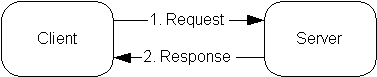
Figure 3.1: Local service configuration.
Use this configuration if you are just starting out (it's the one the quick-start guide makes for you) or if you want to provide a local service and are not interested in connecting to the rest of the world. It's easy to upgrade to another configuration later if you want.
3.2. Local Directory Service with Referrals
In this configuration, you run a slapd which provides directory service for your local domain and configure it to return referrals to a superior service capable of handling requests outside your local domain. You may run this service yourself or use one provided to you. This configuration is shown in Figure 3.2.
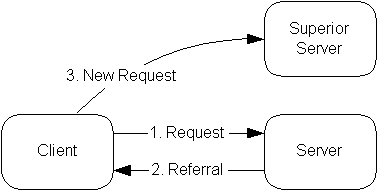
Figure 3.2: Local service with referrals
Use this configuration if you want to provide local service and participate in the Global Directory.
3.3. Replicated Directory Service
The slurpd daemon is used to propagate changes from a master slapd to one or more slave slapds. An example master-slave configuration is shown in figure 3.3.
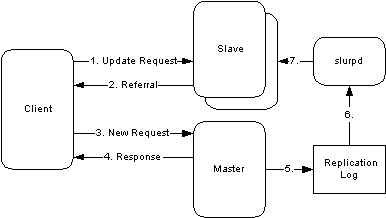
Figure 3.3: Replicated Directory Services
This configuration can be used in conjunction with either of the first two configurations in situations where a single slapd does not provide the required reliability or availability.
3.4. Distributed Local Directory Service
In this configuration, the local service is partitioned into smaller services, each of which may be replicated, and glued together with superior and subordinate referrals.
4. Building and Installing OpenLDAP Software
This chapter details how to build and install the OpenLDAP Software package including slapd(8), the stand-alone LDAP daemon and slurpd(8), the stand-alone update replication daemon. Building and installing OpenLDAP Software requires several steps: installing prerequisite software, configuring OpenLDAP Software itself, making, and finally installing. The following sections describe this process in detail.
4.1. Obtaining and Extracting the Software
You can obtain OpenLDAP Software from the project's download page at http://www.openldap.org/software/download/ or directly from the project's
The project makes available two series of packages for general use. The project makes releases as new features and bug fixes come available. Though the project takes steps to improve stablity of these releases, it is common for problems to arise only after release. The stable release is the latest release which has demonstrated stability through general use.
Users of OpenLDAP Software can choose, depending on their desire for the latest features versus demonstrated stability, the most appropriate series to install.
After downloading OpenLDAP Software, you need to extract the distribution from the compressed archive file and change your working directory to the top directory of the distribution:
-
gunzip -c openldap-VERSION.tgz | tar xf -
cd openldap-VERSION
You'll have to replace VERSION with the version name of the release.
You should now review the COPYRIGHT, LICENSE, README and INSTALL documents provided with the distribution. The COPYRIGHT and LICENSE provide information on acceptable use, copying, and limitation of warranty of OpenLDAP Software. The README and INSTALL documents provide detailed information on prerequisite software and installation procedures.
4.2. Prerequisite software
OpenLDAP Software relies upon a number of software packages distributed by third parties. Depending on the features you intend to use, you may have to download and install a number of additional software packages. This section details commonly needed third party software packages you might have to install. Note that some of these third party packages may depend on additional software packages. Install each package per the installation instructions provided with it.
4.2.1. Transport Layer Security
OpenLDAP clients and servers require installation of OpenSSL
OpenSSL is available from http://www.openssl.org/.
OpenLDAP Software will not be fully LDAPv3 compliant unless OpenLDAP's configure detects a usable OpenSSL installation.
4.2.2. Kerberos Authentication Services
OpenLDAP clients and servers support Kerberos-based authentication services. In particular, OpenLDAP supports the
Heimdal Kerberos is available from http://www.pdc.kth.se/heimdal/. MIT Kerberos is available from http://web.mit.edu/kerberos/www/.
Use of strong authentication services, such as those provided by Kerberos, is highly recommended.
4.2.3. Simple Authentication and Security Layer
OpenLDAP clients and servers require installation of Cyrus's SASL libraries to provide
Cyrus SASL is available from http://asg.web.cmu.edu/sasl/sasl-library.html. Cyrus SASL will make use of OpenSSL and Kerberos/GSSAPI libraries if preinstalled.
OpenLDAP Software will not be fully LDAPv3 compliant unless OpenLDAP's configure detects a usable Cyrus SASL installation.
4.2.4. Database Software
OpenLDAP's slapd(8) primary database backend,
Your operating system may provide Berkeley DB, version 4, in the base system or as an optional software component. If not, you'll have to obtain and install it yourself.
Berkeley DB is available from Sleepycat Software's download page http://www.sleepycat.com/download/. There are several versions available. At the time of this writing, the latest release, version 4.1, is recommended. This package is required if you wish to use the
OpenLDAP's slapd(8) LDBM backend supports a variety of data base managers including Berkeley DB and GDBM. GDBM is available from FSF's download site ftp://ftp.gnu.org/pub/gnu/gdbm/.
4.2.5. Threads
OpenLDAP is designed to take advantage of threads. OpenLDAP supports POSIX pthreads, Mach CThreads, and a number of other varieties. configure will complain if it cannot find a suitable thread subsystem. If this occurs, please consult the Software|Installation|Platform Hints section of the OpenLDAP FAQ http://www.openldap.org/faq/.
4.2.6. TCP Wrappers
slapd(8) supports TCP Wrappers (IP level access control filters) if preinstalled. Use of TCP Wrappers or other IP-level access filters (such as those provided by an IP-level firewall) is recommended for servers containing non-public information.
4.3. Running configure
Now you should probably run the configure script with the --help option. This will give you a list of options that you can change when building OpenLDAP. Many of the features of OpenLDAP can be enabled or disabled using this method.
./configure --help
The configure script will also look at various environment variables for certain settings. These environment variables include:
| Variable | Description |
| CC | Specify alternative C Compiler |
| CFLAGS | Specify additional compiler flags |
| CPPFLAGS | Specify C Preprocessor flags |
| LDFLAGS | Specify linker flags |
| LIBS | Specify additional libraries |
Now run the configure script with any desired configuration options or environment variables.
[[env] settings] ./configure [options]
As an example, let's assume that we want to install OpenLDAP with BDB backend and TCP Wrappers support. By default, BDB is enabled and TCP Wrappers is not. So, we just need to specify --with-wrappers to include TCP Wrappers support:
./configure --with-wrappers
However, this will fail to locate dependent software not installed in system directories. For example, if TCP Wrappers headers and libraries are installed in /usr/local/include and /usr/local/lib respectively, the configure script should be called as follows:
        env CPPFLAGS="-I/usr/local/include" LDFLAGS="-L/usr/local/lib" \
                ./configure --with-wrappers
Note: Some shells, such as those derived from the Bourne sh(1), do not require use of the env(1) command. In some cases, environmental variables have to be specified using alternative syntaxes.
The configure script will normally auto-detect appropriate settings. If you have problems at this stage, consult any platform specific hints and check your configure options, if any.
4.4. Building the Software
Once you have run the configure script the last line of output should be:
Please "make depend" to build dependencies
If the last line of output does not match, configure has failed, and you will need to review its output to determine what went wrong. You should not proceed until configure completes successfully.
To build dependencies, run:
make depend
Now build the software, this step will actually compile OpenLDAP.
make
You should examine the output of this command carefully to make sure everything is built correctly. Note that this command builds the LDAP libraries and associated clients as well as slapd(8) and slurpd(8).
4.5. Testing the Software
Once the software has been properly configured and successfully made, you should run the test suite to verify the build.
make test
Tests which apply to your configuration will run and they should pass. Some tests, such as the replication test, may be skipped if not supported by your configuration.
4.6. Installing the Software
Once you have successfully tested the software, you are ready to install it. You will need to have write permission to the installation directories you specified when you ran configure. By default OpenLDAP Software is installed in /usr/local. If you changed this setting with the --prefix configure option, it will be installed in the location you provided.
Typically, the installation requires super-user privileges. From the top level OpenLDAP source directory, type:
su root -c 'make install'
and enter the appropriate password when requested.
You should examine the output of this command carefully to make sure everything is installed correctly. You will find the configuration files for slapd(8) in /usr/local/etc/openldap by default. See the chapter The slapd Configuration File for additional information.
5. The slapd Configuration File
Once the software has been built and installed, you are ready to configure slapd(8) for use at your site. The slapd runtime configuration is primarily accomplished through the slapd.conf(5) file, normally installed in the /usr/local/etc/openldap directory.
An alternate configuration file can be specified via a command-line option to slapd(8) or slurpd(8). This chapter describes the general format of the config file, followed by a detailed description of commonly used config file directives.
5.1. Configuration File Format
The slapd.conf(5) file consists of three types of configuration information: global, backend specific, and database specific. Global information is specified first, followed by information associated with a particular backend type, which is then followed by information associated with a particular database instance. Global directives can be overridden in backend and/or database directives, and backend directives can be overridden by database directives.
Blank lines and comment lines beginning with a '#' character are ignored. If a line begins with white space, it is considered a continuation of the previous line (even if the previous line is a comment).
The general format of slapd.conf is as follows:
        # global configuration directives
        <global config directives>

        # backend definition
        backend <typeA>
        <backend-specific directives>

        # first database definition & config directives
        database <typeA>
        <database-specific directives>

        # second database definition & config directives
        database <typeB>
        <database-specific directives>

        # second database definition & config directives
        database <typeA>
        <database-specific directives>

        # subsequent backend & database definitions & config directives
        ...
A configuration directive may take arguments. If so, they are separated by white space. If an argument contains white space, the argument should be enclosed in double quotes "like this". If an argument contains a double quote or a backslash character `\', the character should be preceded by a backslash character `\'.
The distribution contains an example configuration file that will be installed in the /usr/local/etc/openldap directory. A number of files containing schema definitions (attribute types and object classes) are also provided in the /usr/local/etc/openldap/schema directory.
5.2. Configuration File Directives
This section details commonly used configuration directives. For a complete list, see the slapd.conf(5) manual page. This section separates the configuration file directives into global, backend-specific and data-specific categories, describing each directive and its default value (if any), and giving an example of its use.
5.2.1. Global Directives
Directives described in this section apply to all backends and databases unless specifically overridden in a backend or database definition. Arguments that should be replaced by actual text are shown in brackets <>.
5.2.1.1. access to <what> [ by <who> <accesslevel> <control> ]+
This directive grants access (specified by <accesslevel>) to a set of entries and/or attributes (specified by <what>) by one or more requesters (specified by <who>). See the Access Control section of this chapter for a summary of basic usage.
Note: If no access directives are specified, the default access control policy, access to * by * read, allows all both authenticated and anonymous users read access.
5.2.1.2. attributetype <RFC2252 Attribute Type Description>
This directive defines an attribute type. Please see the Schema Specification chapter for information regarding how to use this directive.
5.2.1.3. idletimeout <integer>
Specify the number of seconds to wait before forcibly closing an idle client connection. An idletimeout of 0, the default, disables this feature.
5.2.1.4. include <filename>
This directive specifies that slapd should read additional configuration information from the given file before continuing with the next line of the current file. The included file should follow the normal slapd config file format. The file is commonly used to include files containing schema specifications.
Note: You should be careful when using this directive - there is no small limit on the number of nested include directives, and no loop detection is done.
5.2.1.5. loglevel <integer>
This directive specifies the level at which debugging statements and operation statistics should be syslogged (currently logged to the syslogd(8) LOG_LOCAL4 facility). You must have configured OpenLDAP --enable-debug (the default) for this to work (except for the two statistics levels, which are always enabled). Log levels are additive. To display what numbers correspond to what kind of debugging, invoke slapd with -? or consult the table below. The possible values for <integer> are:
| Level | Description |
| -1 | enable all debugging |
| 0 | no debugging |
| 1 | trace function calls |
| 2 | debug packet handling |
| 4 | heavy trace debugging |
| 8 | connection management |
| 16 | print out packets sent and received |
| 32 | search filter processing |
| 64 | configuration file processing |
| 128 | access control list processing |
| 256 | stats log connections/operations/results |
| 512 | stats log entries sent |
| 1024 | print communication with shell backends |
| 2048 | print entry parsing debugging |
Example:
loglevel -1
This will cause lots and lots of debugging information to be logged.
Default:
loglevel 256
5.2.1.6. objectclass <RFC2252 Object Class Description>
This directive defines an object class. Please see the Schema Specification chapter for information regarding how to use this directive.
5.2.1.7. referral <URI>
This directive specifies the referral to pass back when slapd cannot find a local database to handle a request.
Example:
referral ldap://root.openldap.org
This will refer non-local queries to the global root LDAP server at the OpenLDAP Project. Smart LDAP clients can re-ask their query at that server, but note that most of these clients are only going to know how to handle simple LDAP URLs that contain a host part and optionally a distinguished name part.
5.2.1.8. sizelimit <integer>
This directive specifies the maximum number of entries to return from a search operation.
Default:
sizelimit 500
5.2.1.9. timelimit <integer>
This directive specifies the maximum number of seconds (in real time) slapd will spend answering a search request. If a request is not finished in this time, a result indicating an exceeded timelimit will be returned.
Default:
timelimit 3600
5.2.2. General Backend Directives
Directives in this section apply only to the backend in which they are defined. They are supported by every type of backend. Backend directives apply to all databases instances of the same type and, depending on the directive, may be overridden by database directives.
5.2.2.1. backend <type>
This directive marks the beginning of a backend declaration. <type> should be one of the supported backend types listed in Table 5.2.
| Types | Description |
| bdb | Berkeley DB transactional backend |
| dnssrv | DNS SRV backend |
| ldap | Lightweight Directory Access Protocol (Proxy) backend |
| ldbm | Lightweight DBM backend |
| meta | Meta Directory backend |
| monitor | Monitor backend |
| passwd | Provides read-only access to passwd(5) |
| perl | Perl Programmable backend |
| shell | Shell (extern program) backend |
| sql | SQL Programmable backend |
Example:
backend bdb
This marks the beginning of a new
5.2.3. General Database Directives
Directives in this section apply only to the database in which they are defined. They are supported by every type of database.
5.2.3.1. database <type>
This directive marks the beginning of a database instance declaration. <type> should be one of the supported backend types listed in Table 5.2.
Example:
database bdb
This marks the beginning of a new
5.2.3.2. readonly { on | off }
This directive puts the database into "read-only" mode. Any attempts to modify the database will return an "unwilling to perform" error.
Default:
readonly off
5.2.3.3. replica
        replica uri=ldap[s]://<hostname>[:<port>] | host=<hostname>[:<port>]
                [bindmethod={simple|kerberos|sasl}]
                ["binddn=<DN>"]
                [saslmech=<mech>]
                [authcid=<identity>]
                [authzid=<identity>]
                [credentials=<password>]
                [srvtab=<filename>]
This directive specifies a replication site for this database. The uri= parameter specifies a scheme, a host and optionally a port where the slave slapd instance can be found. Either a domain name or IP address may be used for <hostname>. If <port> is not given, the standard LDAP port number (389 or 636) is used.
host is deprecated in favor of the uri parameter.
uri allows the replica LDAP server to be specified as an LDAP URI such as ldap://slave.example.com:389 or ldaps://slave.example.com:636.
The binddn= parameter gives the DN to bind as for updates to the slave slapd. It should be a DN which has read/write access to the slave slapd's database. It must also match the updatedn directive in the slave slapd's config file. Generally, this DN should not be the same as the rootdn of the master database. Since DNs are likely to contain embedded spaces, the entire "binddn=<DN>" string should be enclosed in double quotes.
The bindmethod is simple or kerberos or sasl, depending on whether simple password-based authentication or Kerberos authentication or
Simple authentication should not be used unless adequate integrity and privacy protections are in place (e.g. TLS or IPSEC). Simple authentication requires specification of binddn and credentials parameters.
Kerberos authentication is deprecated in favor of SASL authentication mechanisms, in particular the KERBEROS_V4 and GSSAPI mechanisms. Kerberos authentication requires binddn and srvtab parameters.
SASL authentication is generally recommended. SASL authentication requires specification of a mechanism using the saslmech parameter. Depending on the mechanism, an authentication identity and/or credentials can be specified using authcid and credentials respectively. The authzid parameter may be used to specify an authorization identity.
See the chapter entitled Replication with slurpd for more information on how to use this directive.
5.2.3.4. replogfile <filename>
This directive specifies the name of the replication log file to which slapd will log changes. The replication log is typically written by slapd and read by slurpd. Normally, this directive is only used if slurpd is being used to replicate the database. However, you can also use it to generate a transaction log, if slurpd is not running. In this case, you will need to periodically truncate the file, since it will grow indefinitely otherwise.
See the chapter entitled Replication with slurpd for more information on how to use this directive.
5.2.3.5. rootdn <DN>
This directive specifies the DN that is not subject to access control or administrative limit restrictions for operations on this database. The DN need not refer to an entry in this database or even in the directory. The DN may refer to a SASL identity.
Entry-based Example:
rootdn "cn=Manager,dc=example,dc=com"
SASL-based Example:
rootdn "uid=root,cn=example.com,cn=digest-md5,cn=auth"
See the SASL Authentication section for information on SASL authentication identities.
5.2.3.6. rootpw <password>
This directive can be used to specifies a password for the DN for the rootdn (when the rootdn is set to a DN within the database).
Example:
rootpw secret
It is also permissible to provide hash of the password in RFC 2307 form. slappasswd(8) may be used to generate the password hash.
Example:
rootpw {SSHA}ZKKuqbEKJfKSXhUbHG3fG8MDn9j1v4QN
The hash was generated using the command slappasswd -s secret.
5.2.3.7. suffix <dn suffix>
This directive specifies the DN suffix of queries that will be passed to this backend database. Multiple suffix lines can be given, and at least one is required for each database definition.
Example:
suffix "dc=example,dc=com"
Queries with a DN ending in "dc=example,dc=com" will be passed to this backend.
Note: When the backend to pass a query to is selected, slapd looks at the suffix line(s) in each database definition in the order they appear in the file. Thus, if one database suffix is a prefix of another, it must appear after it in the config file.
5.2.3.8. syncrepl
        syncrepl rid=<replica ID>
                provider=ldap[s]://<hostname>[:port]
                [type=refreshOnly|refreshAndPersist]
                [interval=dd:hh:mm:ss]
                [searchbase=<base DN>]
                [filter=<filter str>]
                [scope=sub|one|base]
                [attrs=<attr list>]
                [attrsonly]
                [sizelimit=<limit>]
                [timelimit=<limit>]
                [schemachecking=on|off]
                [updatedn=<DN>]
                [bindmethod=simple|sasl]
                [binddn=<DN>]
                [saslmech=<mech>]
                [authcid=<identity>]
                [authzid=<identity>]
                [credentials=<passwd>]
                [realm=<realm>]
                [secprops=<properties>]
This directive specifies the current database as a replica of the master content by establishing the current slapd(8) as a replication consumer site running a syncrepl replication engine. The master database is located at the replication provider site specified by the provider parameter. The replica database is kept up-to-date with the master content using the LDAP Content Synchronization protocol. See draft-zeilenga-ldup-sync-xx.txt (a work in progress) for more information on the protocol.
The rid parameter is used for identification of the current syncrepl directive within the replication consumer server, where <replica ID> uniquely identifies the syncrepl specification described by the current syncrepl directive. <replica ID> is non-negative and is no more than three decimal digits in length.
The provider parameter specifies the replication provider site containing the master content as an LDAP URI. The provider parameter specifies a scheme, a host and optionally a port where the provider slapd instance can be found. Either a domain name or IP address may be used for <hostname>. Examples are ldap://provider.example.com:389 or ldaps://192.168.1.1:636. If <port> is not given, the standard LDAP port number (389 or 636) is used. Note that the syncrepl uses a consumer-initiated protocol, and hence its specification is located at the consumer site, whereas the replica specification is located at the provider site. syncrepl and replica directives define two independent replication mechanisms. They do not represent the replication peers of each other.
The content of the syncrepl replica is defined using a search specification as its result set. The consumer slapd will send search requests to the provider slapd according to the search specification. The search specification includes searchbase, scope, filter, attrs, attrsonly, sizelimit, and timelimit parameters as in the normal search specification. The syncrepl search specification has the same value syntax and the same default values as in the ldapsearch(1) client search tool.
The LDAP Content Synchronization protocol has two operation types: refreshOnly and refreshAndPersist. The operation type is specified by the type parameter. In the refreshOnly operation, the next synchronization search operation is periodically rescheduled at an interval time after each synchronization operation finishes. The interval is specified by the interval parameter. It is set to one day by default. In the refreshAndPersist operation, a synchronization search remains persistent in the provider slapd. Further updates to the master replica will generate searchResultEntry to the consumer slapd as the search responses to the persistent synchronization search.
The schema checking can be enforced at the LDAP Sync consumer site by turning on the schemachecking parameter. If it is turned on, every replicated entry will be checked for its schema as the entry is stored into the replica content. Every entry in the replica should contain those attributes required by the schema definition. If it is turned off, entries will be stored without checking schema conformance. The default is off.
The updatedn parameter specifies the DN in the consumer site which is allowed to make changes to the replica. This DN is used locally by the syncrepl engine when updating the replica with the entries received from the provider site by using the internal operation mechanism. The update of the replica content is subject to the access control privileges of the DN. The DN should have read/write access to the replica database. Generally, this DN should not be the same as rootdn.
The binddn parameter gives the DN to bind as for the syncrepl searches to the provider slapd. It should be a DN which has read access to the replication content in the master database.
The bindmethod is simple or sasl, depending on whether simple password-based authentication or
Simple authentication should not be used unless adequate integrity and privacy protections are in place (e.g. TLS or IPSEC). Simple authentication requires specification of binddn and credentials parameters.
SASL authentication is generally recommended. SASL authentication requires specification of a mechanism using the saslmech parameter. Depending on the mechanism, an authentication identity and/or credentials can be specified using authcid and credentials, respectively. The authzid parameter may be used to specify an authorization identity.
The realm parameter specifies a realm which a certain mechanisms authenticate the identity within. The secprops parameter specifies Cyrus SASL security properties.
The syncrepl replication mechanism is supported by the three native backends: back-bdb, back-hdb, and back-ldbm.
See the LDAP Sync Replication chapter of the admin guide for more information on how to use this directive.
5.2.3.9. updatedn <DN>
This directive is only applicable in a slave slapd. It specifies the DN allowed to make changes to the replica. This may be the DN slurpd(8) binds as when making changes to the replica or the DN associated with a SASL identity.
Entry-based Example:
updatedn "cn=Update Daemon,dc=example,dc=com"
SASL-based Example:
updatedn "uid=slurpd,cn=example.com,cn=digest-md5,cn=auth"
See the Replication with slurpd chapter for more information on how to use this directive.
5.2.3.10. updateref <URL>
This directive is only applicable in a slave slapd. It specifies the URL to return to clients which submit update requests upon the replica. If specified multiple times, each
Example:
updateref ldap://master.example.net
5.2.4. BDB Database Directives
Directives in this category only apply to a
5.2.4.1. directory <directory>
This directive specifies the directory where the BDB files containing the database and associated indices live.
Default:
directory /usr/local/var/openldap-data
5.2.4.2. sessionlog <sid> <limit>
This directive specifies a session log store in the syncrepl replication provider server which contains information on the entries that have been scoped out of the replication content identified by <sid>. The first syncrepl search request having the same <sid> value in the cookie establishes the session log store in the provider server. The number of the entries in the session log store is limited by <limit>. Excessive entries are removed from the store in the FIFO order. Both <sid> and <limit> are non-negative integers. <sid> has no more than three decimal digits.
The LDAP Content Synchronization operation that falls into a pre-existing session can use the session log store in order to reduce the amount of synchronization traffic. If the replica is not so outdated that it can be made up-to-date by the information in the session store, the provider slapd will send the consumer slapd the identities of the scoped-out entries together with the in-scope entries added to or modified within the replication content. If the replica status is outdated too much and beyond the coverage of the history store, then the provider slapd will send the identities of the unchanged in-scope entries along with the changed in-scope entries. The consumer slapd will then remove those entries in the replica which are not identified as present in the provider content.
5.2.5. LDBM Database Directives
Directives in this category only apply to a
5.2.5.1. cachesize <integer>
This directive specifies the size in entries of the in-memory cache maintained by the LDBM backend database instance.
Default:
cachesize 1000
5.2.5.2. dbcachesize <integer>
This directive specifies the size in bytes of the in-memory cache associated with each open index file. If not supported by the underlying database method, this directive is ignored without comment. Increasing this number uses more memory but can cause a dramatic performance increase, especially during modifies or when building indices.
Default:
dbcachesize 100000
5.2.5.3. dbnolocking
This option, if present, disables database locking. Enabling this option may improve performance at the expense of data security.
5.2.5.4. dbnosync
This option causes on-disk database contents to not be immediately synchronized with in memory changes upon change. Enabling this option may improve performance at the expense of data integrity.
5.2.5.5. directory <directory>
This directive specifies the directory where the LDBM files containing the database and associated indices live.
Default:
directory /usr/local/var/openldap-data
5.2.5.6. index {<attrlist> | default} [pres,eq,approx,sub,none]
This directive specifies the indices to maintain for the given attribute. If only an <attrlist> is given, the default indices are maintained.
Example:
        index default pres,eq
        index uid
        index cn,sn pres,eq,sub
        index objectClass eq
The first line sets the default set of indices to maintain to present and equality. The second line causes the default (pres,eq) set of indices to be maintained for the uid attribute type. The third line causes present, equality, and substring indices to be maintained for cn and sn attribute types. The fourth line causes an equality index for the objectClass attribute type.
By default, no indices are maintained. It is generally advised that minimally an equality index upon objectClass be maintained.
index objectClass eq
5.2.5.7. mode <integer>
This directive specifies the file protection mode that newly created database index files should have.
Default:
mode 0600
5.3. Access Control
Access to slapd entries and attributes is controlled by the access configuration file directive. The general form of an access line is:
        <access directive> ::= access to <what>
                [by <who> <access> <control>]+
        <what> ::= * |
                [dn[.<basic-style>]=<regex> | dn.<scope-style>=<DN>]
                [filter=<ldapfilter>] [attrs=<attrlist>]
        <basic-style> ::= regex | exact
        <scope-style> ::= base | one | subtree | children
        <attrlist> ::= <attr> [val[.<basic-style>]=<regex>] | <attr> , <attrlist>
        <attr> ::= <attrname> | entry | children
        <who> ::= * | [anonymous | users | self
                        | dn[.<basic-style>]=<regex> | dn.<scope-style>=<DN>]
                [dnattr=<attrname>]
                [group[/<objectclass>[/<attrname>][.<basic-style>]]=<regex>]
                [peername[.<basic-style>]=<regex>]
                [sockname[.<basic-style>]=<regex>]
                [domain[.<basic-style>]=<regex>]
                [sockurl[.<basic-style>]=<regex>]
                [set=<setspec>]
                [aci=<attrname>]
        <access> ::= [self]{<level>|<priv>}
        <level> ::= none | auth | compare | search | read | write
        <priv> ::= {=|+|-}{w|r|s|c|x|0}+
        <control> ::= [stop | continue | break]
where the <what> part selects the entries and/or attributes to which the access applies, the <who> part specifies which entities are granted access, and the <access> part specifies the access granted. Multiple <who> <access> <control> triplets are supported, allowing many entities to be granted different access to the same set of entries and attributes. Not all of these access control options are described here; for more details see the slapd.access(5) man page.
5.3.1. What to control access to
The <what> part of an access specification determines the entries and attributes to which the access control applies. Entries are commonly selected in two ways: by DN and by filter. The following qualifiers select entries by DN:
        to *
        to dn[.<basic-style>]=<regex>
        to dn.<scope-style>=<DN>
The first form is used to select all entries. The second form may be used to select entries by matching a regular expression against the target entry's normalized DN. (The second form is not discussed further in this document.) The third form is used to select entries which are within the requested scope of DN. The <DN> is a string representation of the Distinguished Name, as described in RFC2253.
The scope can be either base, one, subtree, or children. Where base matches only the entry with provided DN, one matches the entries whose parent is the provided DN, subtree matches all entries in the subtree whose root is the provided DN, and children matches all entries under the DN (but not the entry named by the DN).
For example, if the directory contained entries named:
        0: o=suffix
        1: cn=Manager,o=suffix
        2: ou=people,o=suffix
        3: uid=kdz,ou=people,o=suffix
        4: cn=addresses,uid=kdz,ou=people,o=suffix
        5: uid=hyc,ou=people,o=suffix
Then:
-
dn.base="ou=people,o=suffix" match 2;
dn.one="ou=people,o=suffix" match 3, and 5;
dn.subtree="ou=people,o=suffix" match 2, 3, 4, and 5; and
dn.children="ou=people,o=suffix" match 3, 4, and 5.
Entries may also be selected using a filter:
to filter=<ldap filter>
where <ldap filter> is a string representation of an LDAP search filter, as described in RFC2254. For example:
to filter=(objectClass=person)
Note that entries may be selected by both DN and filter by including both qualifiers in the <what> clause.
to dn.one="ou=people,o=suffix" filter=(objectClass=person)
Attributes within an entry are selected by including a comma-separated list of attribute names in the <what> selector:
attrs=<attribute list>
A specific value of an attribute is selected by using a single attribute name and also using a value selector:
attrs=<attribute> val[.<style>]=<regex>
There are two special pseudo attributes entry and children. To read (and hence return) a target entry, the subject must have read access to the target's entry attribute. To add or delete an entry, the subject must have write access to the entry's entry attribute AND must have write access to the entry's parent's children attribute. To rename an entry, the subject must have write access to entry's entry attribute AND have write access to both the old parent's and new parent's children attributes. The complete examples at the end of this section should help clear things up.
Lastly, there is a special entry selector "*" that is used to select any entry. It is used when no other <what> selector has been provided. It's equivalent to "dn=.*"
5.3.2. Who to grant access to
The <who> part identifies the entity or entities being granted access. Note that access is granted to "entities" not "entries." The following table summarizes entity specifiers:
| Specifier | Entities |
| * | All, including anonymous and authenticated users |
| anonymous | Anonymous (non-authenticated) users |
| users | Authenticated users |
| self | User associated with target entry |
| dn[.<basic-style>]=<regex> | Users matching a regular expression |
| dn.<scope-style>=<DN> | Users within scope of a DN |
The DN specifier behaves much like <what> clause DN specifiers.
Other control factors are also supported. For example, a <who> can be restricted by an entry listed in a DN-valued attribute in the entry to which the access applies:
dnattr=<dn-valued attribute name>
The dnattr specification is used to give access to an entry whose DN is listed in an attribute of the entry (e.g., give access to a group entry to whoever is listed as the owner of the group entry).
Some factors may not be appropriate in all environments (or any). For example, the domain factor relies on IP to domain name lookups. As these can easily spoofed, the domain factor should not be avoided.
5.3.3. The access to grant
The kind of <access> granted can be one of the following:
| Level | Privileges | Description |
| none | =0 | no access |
| auth | =x | needed to bind |
| compare | =cx | needed to compare |
| search | =scx | needed to apply search filters |
| read | =rscx | needed to read search results |
| write | =wrscx | needed to modify/rename |
Each level implies all lower levels of access. So, for example, granting someone write access to an entry also grants them read, search, compare, and auth access. However, one may use the privileges specifier to grant specific permissions.
5.3.4. Access Control Evaluation
When evaluating whether some requester should be given access to an entry and/or attribute, slapd compares the entry and/or attribute to the <what> selectors given in the configuration file. For each entry, access controls provided in the database which holds the entry (or the first database if not held in any database) apply first, followed by the global access directives. Within this priority, access directives are examined in the order in which they appear in the config file. Slapd stops with the first <what> selector that matches the entry and/or attribute. The corresponding access directive is the one slapd will use to evaluate access.
Next, slapd compares the entity requesting access to the <who> selectors within the access directive selected above in the order in which they appear. It stops with the first <who> selector that matches the requester. This determines the access the entity requesting access has to the entry and/or attribute.
Finally, slapd compares the access granted in the selected <access> clause to the access requested by the client. If it allows greater or equal access, access is granted. Otherwise, access is denied.
The order of evaluation of access directives makes their placement in the configuration file important. If one access directive is more specific than another in terms of the entries it selects, it should appear first in the config file. Similarly, if one <who> selector is more specific than another it should come first in the access directive. The access control examples given below should help make this clear.
5.3.5. Access Control Examples
The access control facility described above is quite powerful. This section shows some examples of its use. First, some simple examples:
access to * by * read
This access directive grants read access to everyone.
        access to *
                by self write
                by anonymous auth
                by * read
This directive allows the user to modify their entry, allows anonymous to authentication against these entries, and allows all others to read these entries. Note that only the first by <who> clause which matches applies. Hence, the anonymous users are granted auth, not read. The last clause could just as well have been "by users read".
It is often desirable to restrict operations based upon the level of protection in place. The following shows how security strength factors (SSF) can be used.
        access to *
                by ssf=128 self write
                by ssf=64 anonymous auth
                by ssf=64 users read
This directive allows users to modify their own entries if security protections have of strength 128 or better have been established, allows authentication access to anonymous users, and read access when 64 or better security protections have been established. If client has not establish sufficient security protections, the implicit by * none clause would be applied.
The following example shows the use of a style specifiers to select the entries by DN in two access directives where ordering is significant.
        access to dn.children="dc=example,dc=com"
                by * search
        access to dn.children="dc=com"
                by * read
Read access is granted to entries under the dc=com subtree, except for those entries under the dc=example,dc=com subtree, to which search access is granted. No access is granted to dc=com as neither access directive matches this DN. If the order of these access directives was reversed, the trailing directive would never be reached, since all entries under dc=example,dc=com are also under dc=com entries.
Also note that if no access to directive matches or no by <who> clause, access is denied. That is, every access to directive ends with an implicit by * none clause and every access list ends with an implicit access to * by * none directive.
The next example again shows the importance of ordering, both of the access directives and the by <who> clauses. It also shows the use of an attribute selector to grant access to a specific attribute and various <who> selectors.
        access to dn.subtree="dc=example,dc=com" attr=homePhone
                by self write
                by dn.children=dc=example,dc=com" search
                by peername=IP:10\..+ read
        access to dn.subtree="dc=example,dc=com"
                by self write
                by dn.children="dc=example,dc=com" search
                by anonymous auth
This example applies to entries in the "dc=example,dc=com" subtree. To all attributes except homePhone, an entry can write to itself, entries under example.com entries can search by them, anybody else has no access (implicit by * none) excepting for authentication/authorization (which is always done anonymously). The homePhone attribute is writable by the entry, searchable by entries under example.com, readable by clients connecting from network 10, and otherwise not readable (implicit by * none). All other access is denied by the implicit access to * by * none.
Sometimes it is useful to permit a particular DN to add or remove itself from an attribute. For example, if you would like to create a group and allow people to add and remove only their own DN from the member attribute, you could accomplish it with an access directive like this:
        access to attr=member,entry
                by dnattr=member selfwrite
The dnattr <who> selector says that the access applies to entries listed in the member attribute. The selfwrite access selector says that such members can only add or delete their own DN from the attribute, not other values. The addition of the entry attribute is required because access to the entry is required to access any of the entry's attributes.
5.4. Configuration File Example
The following is an example configuration file, interspersed with explanatory text. It defines two databases to handle different parts of the
  1.    # example config file - global configuration section
  2.    include /usr/local/etc/schema/core.schema
  3.    referral ldap://root.openldap.org
  4.    access to * by * read
Line 1 is a comment. Line 2 includes another config file which contains core schema definitions. The referral directive on line 3 means that queries not local to one of the databases defined below will be referred to the LDAP server running on the standard port (389) at the host root.openldap.org.
Line 4 is a global access control. It applies to all entries (after any applicable database-specific access controls).
The next section of the configuration file defines a BDB backend that will handle queries for things in the "dc=example,dc=com" portion of the tree. The database is to be replicated to two slave slapds, one on truelies, the other on judgmentday. Indices are to be maintained for several attributes, and the userPassword attribute is to be protected from unauthorized access.
  5.    # BDB definition for the example.com
  6.    database bdb
  7.    suffix "dc=example,dc=com"
  8.    directory /usr/local/var/openldap-data
  9.    rootdn "cn=Manager,dc=example,dc=com"
 10.    rootpw secret
 11.    # replication directives
 12.    replogfile /usr/local/var/openldap/slapd.replog
 13.    replica uri=ldap://slave1.example.com:389
 14.            binddn="cn=Replicator,dc=example,dc=com"
 15.            bindmethod=simple credentials=secret
 16.    replica uri=ldaps://slave2.example.com:636
 17.            binddn="cn=Replicator,dc=example,dc=com"
 18.            bindmethod=simple credentials=secret
 19.    # indexed attribute definitions
 20.    index uid pres,eq
 21.    index cn,sn,uid pres,eq,approx,sub
 22.    index objectClass eq
 23.    # database access control definitions
 24.    access to attr=userPassword
 25.            by self write
 26.            by anonymous auth
 27.            by dn.base="cn=Admin,dc=example,dc=com" write
 28.            by * none
 29.    access to *
 30.            by self write
 31.            by dn.base="cn=Admin,dc=example,dc=com" write
 32.            by * read
Line 5 is a comment. The start of the database definition is marked by the database keyword on line 6. Line 7 specifies the DN suffix for queries to pass to this database. Line 8 specifies the directory in which the database files will live.
Lines 9 and 10 identify the database super-user entry and associated password. This entry is not subject to access control or size or time limit restrictions.
Lines 11 through 18 are for replication. Line 12 specifies the replication log file (where changes to the database are logged - this file is written by slapd and read by slurpd). Lines 13 through 15 specify the hostname and port for a replicated host, the DN to bind as when performing updates, the bind method (simple) and the credentials (password) for the binddn. Lines 16 through 18 specify a second replication site. See the Replication with slurpd chapter for more information on these directives.
Lines 20 through 22 indicate the indices to maintain for various attributes.
Lines 24 through 32 specify access control for entries in this database. As this is the first database, the controls also apply to entries not held in any database (such as the Root DSE). For all applicable entries, the userPassword attribute is writable by the entry itself and by the "admin" entry. It may be used for authentication/authorization purposes, but is otherwise not readable. All other attributes are writable by the entry and the "admin" entry, but may be read by all users (authenticated or not).
The next section of the example configuration file defines another BDB database. This one handles queries involving the dc=example,dc=net subtree but is managed by the same entity as the first database. Note that without line 39, the read access would be allowed due to the global access rule at line 4.
 33.    # BDB definition for example.net
 34.    database bdb
 35.    suffix "dc=example,dc=net"
 36.    directory /usr/local/var/openldap-data-net
 37.    rootdn "cn=Manager,dc=example,dc=com"
 38.    index objectClass eq
 39.    access to * by users read
6. Running slapd
slapd(8) is designed to be run as a stand-alone server. This allows the server to take advantage of caching, manage concurrency issues with underlying databases, and conserve system resources. Running from inetd(8) is NOT an option.
6.1. Command-Line Options
slapd(8) supports a number of command-line options as detailed in the manual page. This section details a few commonly used options.
-f <filename>
This option specifies an alternate configuration file for slapd. The default is normally /usr/local/etc/openldap/slapd.conf.
-h <URLs>
This option specifies alternative listener configurations. The default is ldap:/// which implies LDAP over TCP on all interfaces on the default LDAP port 389. You can specify specific host-port pairs or other protocol schemes (such as ldaps:// or ldapi://). For example, -h "ldaps:// ldap://127.0.0.1:666" will create two listeners: one for LDAP over SSL on all interfaces on the default LDAP/SSL port 636, and one for LDAP over TCP on the localhost (loopback) interface on port 666. Hosts may be specified using IPv4 dotted-decimal form or using host names. Port values must be numeric.
-n <service-name>
This option specifies the service name used for logging and other purposes. The default service name is slapd.
-l <syslog-local-user>
This option specifies the local user for the syslog(8) facility. Values can be LOCAL0, LOCAL1, LOCAL2, ..., and LOCAL7. The default is LOCAL4. This option may not be supported on all systems.
-u user -g group
These options specify the user and group, respectively, to run as. user can be either a user name or uid. group can be either a group name or gid.
-r directory
This option specifies a run-time directory. slapd will chroot(2) to this directory after opening listeners but before reading any configuration files or initializing any backends.
-d <level> | ?
This option sets the slapd debug level to <level>. When level is a `?' character, the various debugging levels are printed and slapd exits, regardless of any other options you give it. Current debugging levels are
| Level | Description |
| -1 | enable all debugging |
| 0 | no debugging |
| 1 | trace function calls |
| 2 | debug packet handling |
| 4 | heavy trace debugging |
| 8 | connection management |
| 16 | print out packets sent and received |
| 32 | search filter processing |
| 64 | configuration file processing |
| 128 | access control list processing |
| 256 | stats log connections/operations/results |
| 512 | stats log entries sent |
| 1024 | print communication with shell backends |
| 2048 | print entry parsing debugging |
You may enable multiple levels by specifying the debug option once for each desired level. Or, since debugging levels are additive, you can do the math yourself. That is, if you want to trace function calls and watch the config file being processed, you could set level to the sum of those two levels (in this case, -d 65). Or, you can let slapd do the math, (e.g. -d 1 -d 64). Consult <ldap_log.h> for more details.
Note: slapd must have been compiled with -DLDAP_DEBUG defined for any debugging information beyond the two stats levels to be available.
6.2. Starting slapd
In general, slapd is run like this:
/usr/local/etc/libexec/slapd [<option>]*
where /usr/local/etc/libexec is determined by configure and <option> is one of the options described above (or in slapd(8)). Unless you have specified a debugging level (including level 0), slapd will automatically fork and detach itself from its controlling terminal and run in the background.
6.3. Stopping slapd
To kill off slapd safely, you should give a command like this
kill -INT `cat /usr/local/var/slapd.pid`
where /usr/local/var is determined by configure.
Killing slapd by a more drastic method may cause information loss or database corruption.
7. Database Creation and Maintenance Tools
This section tells you how to create a slapd database from scratch, and how to do trouble shooting if you run into problems. There are two ways to create a database. First, you can create the database on-line using LDAP. With this method, you simply start up slapd and add entries using the LDAP client of your choice. This method is fine for relatively small databases (a few hundred or thousand entries, depending on your requirements). This method works for database types which support updates.
The second method of database creation is to do it off-line using special utilities provided with slapd. This method is best if you have many thousands of entries to create, which would take an unacceptably long time using the LDAP method, or if you want to ensure the database is not accessed while it is being created. Note that not all database types support these utilitites.
7.1. Creating a database over LDAP
With this method, you use the LDAP client of your choice (e.g., the ldapadd(1)) to add entries, just like you would once the database is created. You should be sure to set the following options in the configuration file before starting slapd(8).
suffix <dn>
As described in the General Database Directives section, this option defines which entries are to be held by this database. You should set this to the DN of the root of the subtree you are trying to create. For example:
suffix "dc=example,dc=com"
You should be sure to specify a directory where the index files should be created:
directory <directory>
For example:
directory /usr/local/var/openldap-data
You need to create this directory with appropriate permissions such that slapd can write to it.
You need to configure slapd so that you can connect to it as a directory user with permission to add entries. You can configure the directory to support a special super-user or root user just for this purpose. This is done through the following two options in the database definition:
        rootdn <dn>
        rootpw <passwd>
For example:
        rootdn "cn=Manager,dc=example,dc=com"
        rootpw secret
These options specify a DN and password that can be used to authenticate as the super-user entry of the database (i.e., the entry allowed to do anything). The DN and password specified here will always work, regardless of whether the entry named actually exists or has the password given. This solves the chicken-and-egg problem of how to authenticate and add entries before any entries yet exist.
Finally, you should make sure that the database definition contains the index definitions you want:
index {<attrlist> | default} [pres,eq,approx,sub,none]
For example, to index the cn, sn, uid and objectclass attributes, the following index directives could be used:
        index cn,sn,uid pres,eq,approx,sub
        index objectClass eq
This would create presence, equality, approximate, and substring indices for the cn, sn, and uid attributes and an equality index for the objectClass attribute. Note that not all index types are available with all attribute types. See The slapd Configuration File section for more information on this option.
Once you have configured things to your liking, start up slapd, connect with your LDAP client, and start adding entries. For example, to add an organization entry and an organizational role entry using the ldapadd tool, you could create an
        # Organization for Example Corporation
        dn: dc=example,dc=com
        objectClass: dcObject
        objectClass: organization
        dc: example
        o: Example Corporation
        description: The Example Corporation

        # Organizational Role for Directory Manager
        dn: cn=Manager,dc=example,dc=com
        objectClass: organizationalRole
        cn: Manager
        description: Directory Manager
and then use a command like this to actually create the entry:
ldapadd -f entries.ldif -x -D "cn=Manager,dc=example,dc=com" -w secret
The above command assumes settings provided in the above examples.
7.2. Creating a database off-line
The second method of database creation is to do it off-line, using the slapd database tools described below. This method is best if you have many thousands of entries to create, which would take an unacceptably long time to add using the LDAP method described above. These tools read the slapd configuration file and an input file containing a text representation of the entries to add. For database types which support the tools, they produce the database files directly (otherwise you must use the on-line method above). There are several important configuration options you will want to be sure and set in the config file database definition first:
suffix <dn>
As described in the General Database Directives section, this option defines which entries are to be held by this database. You should set this to the DN of the root of the subtree you are trying to create. For example:
suffix "dc=example,dc=com"
You should be sure to specify a directory where the index files should be created:
directory <directory>
For example:
directory /usr/local/var/openldap-data
Finally, you need to specify which indices you want to build. This is done by one or more index options.
index {<attrlist> | default} [pres,eq,approx,sub,none]
For example:
        index cn,sn,uid pres,eq,approx,sub
        index objectClass eq
This would create presence, equality, approximate, and substring indices for the cn, sn, and uid attributes and an equality index for the objectClass attribute. Note that not all index types are available with all attribute types. See The slapd Configuration File section for more information on this option.
7.2.1. The slapadd program
Once you've configured things to your liking, you create the primary database and associated indices by running the slapadd(8) program:
        slapadd -l <inputfile> -f <slapdconfigfile>
                [-d <debuglevel>] [-n <integer>|-b <suffix>]
The arguments have the following meanings:
-l <inputfile>
Specifies the
-f <slapdconfigfile>
Specifies the slapd configuration file that tells where to create the indices, what indices to create, etc.
-d <debuglevel>
Turn on debugging, as specified by <debuglevel>. The debug levels are the same as for slapd. See the Command-Line Options section in Running slapd.
-n <databasenumber>
An optional argument that specifies which database to modify. The first database listed in the configuration file is 1, the second 2, etc. By default, the first database in the configuration file is used. Should not be used in conjunction with -b.
-b <suffix>
An optional argument that specifies which database to modify. The provided suffix is matched against a database suffix directive to determine the database number. Should not be used in conjunction with -n.
7.2.2. The slapindex program
Sometimes it may be necessary to regenerate indices (such as after modifying slapd.conf(5)). This is possible using the slapindex(8) program. slapindex is invoked like this
        slapindex -f <slapdconfigfile>
                [-d <debuglevel>] [-n <databasenumber>|-b <suffix>]
Where the -f, -d, -n and -b options are the same as for the slapadd(1) program. slapindex rebuilds all indices based upon the current database contents.
7.2.3. The slapcat program
The slapcat program is used to dump the database to an
        slapcat -l <filename> -f <slapdconfigfile>
                [-d <debuglevel>] [-n <databasenumber>|-b <suffix>]
where -n or -b is used to select the database in the slapd.conf(5) specified using -f. The corresponding
7.3. The LDIF text entry format
The
The basic form of an entry is:
        # comment
        dn: <distinguished name>
        <attrdesc>: <attrvalue>
        <attrdesc>: <attrvalue>

        ...
Lines starting with a '#' character are comments. An attribute description may be a simple attribute type like cn or objectClass or 1.2.3 (an
A line may be continued by starting the next line with a single space or tab character. For example:
        dn: cn=Barbara J Jensen,dc=example,dc=
         com
        cn: Barbara J
          Jensen
is equivalent to:
        dn: cn=Barbara J Jensen,dc=example,dc=com
        cn: Barbara J Jensen
Multiple attribute values are specified on separate lines. e.g.,
        cn: Barbara J Jensen
        cn: Babs Jensen
If an <attrvalue> contains non-printing characters or begins with a space, a colon (':'), or a less than ('<'), the <attrdesc> is followed by a double colon and the base64 encoding of the value. For example, the value " begins with a space" would be encoded like this:
cn:: IGJlZ2lucyB3aXRoIGEgc3BhY2U=
You can also specify a
cn:< file:///path/to/file.jpeg
Multiple entries within the same LDIF file are separated by blank lines. Here's an example of an LDIF file containing three entries.
        # Barbara's Entry
        dn: cn=Barbara J Jensen,dc=example,dc=com
        cn: Barbara J Jensen
        cn: Babs Jensen
        objectClass: person
        sn: Jensen

        # Bjorn's Entry
        dn: cn=Bjorn J Jensen,dc=example,dc=com
        cn: Bjorn J Jensen
        cn: Bjorn Jensen
        objectClass: person
        sn: Jensen
        # Base64 encoded JPEG photo
        jpegPhoto:: /9j/4AAQSkZJRgABAAAAAQABAAD/2wBDABALD
         A4MChAODQ4SERATGCgaGBYWGDEjJR0oOjM9PDkzODdASFxOQ
         ERXRTc4UG1RV19iZ2hnPk1xeXBkeFxlZ2P/2wBDARESEhgVG

        # Jennifer's Entry
        dn: cn=Jennifer J Jensen,dc=example,dc=com
        cn: Jennifer J Jensen
        cn: Jennifer Jensen
        objectClass: person
        sn: Jensen
        # JPEG photo from file
        jpegPhoto:< file:///path/to/file.jpeg
Notice that the jpegPhoto in Bjorn's entry is base 64 encoded and the jpegPhoto in Jennifer's entry is obtained from the location indicated by the URL.
Note: Trailing spaces are not trimmed from values in an LDIF file. Nor are multiple internal spaces compressed. If you don't want them in your data, don't put them there.
8. Schema Specification
This chapter describes how to extend the user schema used by slapd(8). The chapter assumes the reader is familar with the
The first section, Distributed Schema Files details optional schema definitions provided in the distribution and where to obtain other definitions. The second section, Extending Schema, details how to define new schema items.
This chapter does not discuss how to extend system schema used by slapd(8) as this requires source code modification. System schema includes all operational attribute types or any object class which allows or requires an operational attribute (directly or indirectly).
8.1. Distributed Schema Files
OpenLDAP is distributed with a set of schema specifications for your use. Each set is defined in a file suitable for inclusion (using the include directive) in your slapd.conf(5) file. These schema files are normally installed in the /usr/local/etc/openldap/schema directory.
| File | Description |
| core.schema | OpenLDAP core (required) |
| cosine.schema | Cosine and Internet X.500 (useful) |
| inetorgperson.schema | InetOrgPerson (useful) |
| misc.schema | Assorted (experimental) |
| nis.schema | Network Information Services (FYI) |
| openldap.schema | OpenLDAP Project (experimental) |
To use any of these schema files, you only need to include the desired file in the global definitions portion of your slapd.conf(5) file. For example:
        # include schema
        include /usr/local/etc/openldap/schema/core.schema
        include /usr/local/etc/openldap/schema/cosine.schema
        include /usr/local/etc/openldap/schema/inetorgperson.schema
Additional files may be available. Please consult the OpenLDAP FAQ (http://www.openldap.org/faq/).
Note: You should not modify any of the schema items defined in provided files.
8.2. Extending Schema
Schema used by slapd(8) may be extended to support additional syntaxes, matching rules, attribute types, and object classes. This chapter details how to add user application attribute types and object classes using the syntaxes and matching rules already supported by slapd. slapd can also be extended to support additional syntaxes, matching rules and system schema, but this requires some programming and hence is not discussed here.
There are five steps to defining new schema:
- obtain Object Identifer
- choose a name prefix
- create local schema file
- define custom attribute types (if necessary)
- define custom object classes
8.2.1. Object Identifiers
Each schema element is identified by a globally unique
| OID | Assignment |
| 1.1 | Organization's OID |
| 1.1.1 | SNMP Elements |
| 1.1.2 | LDAP Elements |
| 1.1.2.1 | AttributeTypes |
| 1.1.2.1.1 | myAttribute |
| 1.1.2.2 | ObjectClasses |
| 1.1.2.2.1 | myObjectClass |
You are, of course, free to design a hierarchy suitable to your organizational needs under your organization's OID. No matter what hierarchy you choose, you should maintain a registry of assignments you make. This can be a simple flat file or something more sophisticated such as the OpenLDAP OID Registry (http://www.openldap.org/faq/index.cgi?file=197).
For more information about Object Identifers (and a listing service) see http://www.alvestrand.no/harald/objectid/.
-
Under no circumstances should you hijack OID namespace!
To obtain a registered OID at no cost, apply for an OID under the Internet Assigned Numbers Authority (IANA) maintained Private Enterprise arc. Any private enterprise (organization) may request an OID to be assigned under this arc. Just fill out the IANA form at http://www.iana.org/cgi-bin/enterprise.pl and your official OID will be sent to you usually within a few days. Your base OID will be something like 1.3.6.1.4.1.X where X is an integer.
Note: Don't let the "MIB/SNMP" statement on the IANA page confuse you. OIDs obtained using this form may be used for any purpose including identifying LDAP schema elements.
Alternatively, OID name space may be available from a national authority (e.g., ANSI, BSI).
For private experiments, OIDs under 1.1 may be used. The OID 1.1 arc is regarded as dead name space.
8.2.2. Name Prefix
In addition to assigning a unique object identifier to each schema element, you should provide a least one textual name for each element. The name should be both descriptive and not likely to clash with names of other schema elements. In particular, any name you choose should not clash with present or future Standard Track names.
To reduce (but not eliminate) the potential for name clashes, the convention is to prefix names of non-Standard Track with a few letters to localize the changes to your organization. The smaller the organization, the longer your prefix should be.
In the examples below, we have chosen a short prefix 'my' (to save space). Such a short prefix would only be suitable for a very large, global organization. In general, we recommend something like 'deFirm' (German company) or 'comExample' (elements associated with organization associated with example.com).
8.2.3. Local schema file
The objectclass and attributeTypes configuration file directives can be used to define schema rules on entries in the directory. It is customary to create a file to contain definitions of your custom schema items. We recommend you create a file local.schema in /usr/local/etc/openldap/schema/local.schema and then include this file in your slapd.conf(5) file immediately after other schema include directives.
        # include schema
        include /usr/local/etc/openldap/schema/core.schema
        include /usr/local/etc/openldap/schema/cosine.schema
        include /usr/local/etc/openldap/schema/inetorgperson.schema
        # include local schema
        include /usr/local/etc/openldap/schema/local.schema
8.2.4. Attribute Type Specification
The attributetype directive is used to define a new attribute type. The directive uses the same Attribute Type Description (as defined in RFC2252) used by the attributeTypes attribute found in the subschema subentry, e.g.:
attributetype <RFC2252 Attribute Type Description>
where Attribute Type Description is defined by the following
      AttributeTypeDescription = "(" whsp
            numericoid whsp              ; AttributeType identifier
          [ "NAME" qdescrs ]             ; name used in AttributeType
          [ "DESC" qdstring ]            ; description
          [ "OBSOLETE" whsp ]
          [ "SUP" woid ]                 ; derived from this other
                                         ; AttributeType
          [ "EQUALITY" woid              ; Matching Rule name
          [ "ORDERING" woid              ; Matching Rule name
          [ "SUBSTR" woid ]              ; Matching Rule name
          [ "SYNTAX" whsp noidlen whsp ] ; Syntax OID
          [ "SINGLE-VALUE" whsp ]        ; default multi-valued
          [ "COLLECTIVE" whsp ]          ; default not collective
          [ "NO-USER-MODIFICATION" whsp ]; default user modifiable
          [ "USAGE" whsp AttributeUsage ]; default userApplications
          whsp ")"

      AttributeUsage =
          "userApplications"     /
          "directoryOperation"   /
          "distributedOperation" / ; DSA-shared
          "dSAOperation"          ; DSA-specific, value depends on server
where whsp is a space (' '), numericoid is a globally unique OID in dotted-decimal form (e.g. 1.1.0), qdescrs is one or more names, woid is either the name or OID optionally followed by a length specifier (e.g {10}).
For example, the attribute types name and cn are defined in core.schema as:
        attributeType ( 2.5.4.41 NAME 'name'
                DESC 'name(s) associated with the object'
                EQUALITY caseIgnoreMatch
                SUBSTR caseIgnoreSubstringsMatch
                SYNTAX 1.3.6.1.4.1.1466.115.121.1.15{32768} )
        attributeType ( 2.5.4.3 NAME ( 'cn' 'commonName' )
                DESC 'common name(s) assciated with the object'
                SUP name )
Notice that each defines the attribute's OID, provides a short name, and a brief description. Each name is an alias for the OID. slapd(8) returns the first listed name when returning results.
The first attribute, name, holds values of directoryString (UTF-8 encoded Unicode) syntax. The syntax is specified by OID (1.3.6.1.4.1.1466.115.121.1.15 identifies the directoryString syntax). A length recommendation of 32768 is specified. Servers should support values of this length, but may support longer values The field does NOT specify a size constraint, so is ignored on servers (such as slapd) which don't impose such size limits. In addition, the equality and substring matching uses case ignore rules. Below are tables listing commonly used syntax and matching rules (OpenLDAP supports these and many more).
| Name | OID | Description |
| boolean | 1.3.6.1.4.1.1466.115.121.1.7 | boolean value |
| directoryString | 1.3.6.1.4.1.1466.115.121.1.15 | Unicode (UTF-8) string |
| distinguishedName | 1.3.6.1.4.1.1466.115.121.1.12 | LDAP DN |
| integer | 1.3.6.1.4.1.1466.115.121.1.27 | integer |
| numericString | 1.3.6.1.4.1.1466.115.121.1.36 | numeric string |
| OID | 1.3.6.1.4.1.1466.115.121.1.38 | object identifier |
| octetString | 1.3.6.1.4.1.1466.115.121.1.40 | arbitary octets |
| Name | Type | Description |
| booleanMatch | equality | boolean |
| caseIgnoreMatch | equality | case insensitive, space insensitive |
| caseIgnoreOrderingMatch | ordering | case insensitive, space insensitive |
| caseIgnoreSubstringsMatch | substrings | case insensitive, space insensitive |
| caseExactMatch | equality | case sensitive, space insensitive |
| caseExactOrderingMatch | ordering | case sensitive, space insensitive |
| caseExactSubstringsMatch | substrings | case sensitive, space insensitive |
| distinguishedNameMatch | equality | distinguished name |
| integerMatch | equality | integer |
| integerOrderingMatch | ordering | integer |
| numericStringMatch | equality | numerical |
| numericStringOrderingMatch | ordering | numerical |
| numericStringSubstringsMatch | substrings | numerical |
| octetStringMatch | equality | octet string |
| octetStringOrderingStringMatch | ordering | octet string |
| octetStringSubstringsStringMatch | ordering | octet string |
| objectIdentiferMatch | equality | object identifier |
The second attribute, cn, is a subtype of name hence it inherits the syntax, matching rules, and usage of name. commonName is an alternative name.
Neither attribute is restricted to a single value. Both are meant for usage by user applications. Neither is obsolete nor collective.
The following subsections provide a couple of examples.
8.2.4.1. myUniqueName
Many organizations maintain a single unique name for each user. Though one could use displayName (RFC2798), this attribute is really meant to be controlled by the user, not the organization. We could just copy the definition of displayName from inetorgperson.schema and replace the OID, name, and description, e.g:
        attributetype ( 1.1.2.1.1 NAME 'myUniqueName'
                DESC 'unique name with my organization'
                EQUALITY caseIgnoreMatch
                SUBSTR caseIgnoreSubstringsMatch
                SYNTAX 1.3.6.1.4.1.1466.115.121.1.15
                SINGLE-VALUE )
However, if we want this name to be included in name assertions [e.g. (name=*Jane*)], the attribute could alternatively be defined as a subtype of name, e.g.:
        attributetype ( 1.1.2.1.1 NAME 'myUniqueName'
                DESC 'unique name with my organization'
                SUP name )
8.2.4.2. myPhoto
Many organizations maintain a photo of each each user. A myPhoto attribute type could be defined to hold a photo. Of course, one could use just use jpegPhoto (RFC2798) (or a subtype) to hold the photo. However, you can only do this if the photo is in JPEG File Interchange Format. Alternatively, an attribute type which uses the Octet String syntax can be defined, e.g.:
        attributetype ( 1.1.2.1.2 NAME 'myPhoto'
                DESC 'a photo (application defined format)'
                SYNTAX 1.3.6.1.4.1.1466.115.121.1.40
                SINGLE-VALUE )
In this case, the syntax doesn't specify the format of the photo. It's assumed (maybe incorrectly) that all applications accessing this attribute agree on the handling of values.
If you wanted to support multiple photo formats, you could define a separate attribute type for each format, prefix the photo with some typing information, or describe the value using
Another alternative is for the attribute to hold a
        attributetype ( 1.1.2.1.3 NAME 'myPhotoURI'
                DESC 'URI and optional label referring to a photo'
                SUP labeledURI )
8.2.5. Object Class Specification
The objectclasses directive is used to define a new object class. The directive uses the same Object Class Description (as defined in RFC2252) used by the objectClasses attribute found in the subschema subentry, e.g.:
objectclass <RFC2252 Object Class Description>
where Object Class Description is defined by the following
        ObjectClassDescription = "(" whsp
                numericoid whsp      ; ObjectClass identifier
                [ "NAME" qdescrs ]
                [ "DESC" qdstring ]
                [ "OBSOLETE" whsp ]
                [ "SUP" oids ]       ; Superior ObjectClasses
                [ ( "ABSTRACT" / "STRUCTURAL" / "AUXILIARY" ) whsp ]
                        ; default structural
                [ "MUST" oids ]      ; AttributeTypes
                [ "MAY" oids ]       ; AttributeTypes
                whsp ")"
where whsp is a space (' '), numericoid is a globally unique OID in numeric form (e.g. 1.1.0), qdescrs is one or more names, and oids is one or more names and/or OIDs.
8.2.5.1. myPhotoObject
To define an auxiliary object class which allows myPhoto to be added to any existing entry.
        objectclass ( 1.1.2.2.1 NAME 'myPhotoObject'
                DESC 'mixin myPhoto'
                AUXILIARY
                MAY myPhoto )
8.2.5.2. myPerson
If your organization would like have a private structural object class to instantiate users, you can subclass one of the existing person classes, such as inetOrgPerson (RFC2798), and add any additional attributes which you desire.
        objectclass ( 1.1.2.2.2 NAME 'myPerson'
                DESC 'my person'
                SUP inetOrgPerson
                MUST ( myUniqueName $ givenName )
                MAY myPhoto )
The object class inherits the required/allowed attribute types of inetOrgPerson but requires myUniqueName and givenName and allows myPhoto.
8.2.6. OID Macros
To ease the management and use of OIDs, slapd(8) supports Object Identifier macros. The objectIdentifier directive is used to equate a macro (name) with a OID. The OID may possibly be derived from a previously defined OID macro. The slapd.conf(5) syntax is:
objectIdentifier <name> { <oid> | <name>[:<suffix>] }
The following demonstrates definition of a set of OID macros and their use in defining schema elements:
        objectIdentifier myOID  1.1
        objectIdentifier mySNMP myOID:1
        objectIdentifier myLDAP myOID:2
        objectIdentifier myAttributeType        myLDAP:1
        objectIdentifier myObjectClass  myLDAP:2
        attributetype ( myAttributeType:3 NAME 'myPhotoURI'
                DESC 'URI and optional label referring to a photo'
                SUP labeledURI )
        objectclass ( myObjectClass:1 NAME 'myPhotoObject'
                DESC 'mixin myPhoto'
                AUXILIARY
                MAY myPhoto )
9. Security Considerations
OpenLDAP Software is designed to run in a wide variety of computing environments from tightly-controlled closed networks to the global Internet. Hence, OpenLDAP Software provides many different security mechanisms. This chapter describes these mechanisms and discusses security considerations for using OpenLDAP Software.
9.1. Network Security
9.1.1. Selective Listening
By default, slapd(8) will listen on both the IPv4 and IPv6 "any" addresses. It is often desirable to have slapd listen on select address/port pairs. For example, listening only on the IPv4 address 127.0.0.1 will disallow remote access to the directory server. E.g.:
slapd -h ldap://127.0.0.1
While the server can be configured to listen on a particular interface address, this doesn't necessarily restrict access to the server to only those networks accessible via that interface. To selective restrict remote access, it is recommend that an IP Firewall be used to restrict access.
See Command-line Options and slapd(8) for more information.
9.1.2. IP Firewall
Generally, slapd(8) listens on port 389/tcp for LDAP over
As specifics of how to configure IP firewall are dependent on the particular kind of IP firewall used, no examples are provided here. See the document associated with your IP firewall.
9.1.3. TCP Wrappers
OpenLDAP supports
        slapd: 10.0.0.0/255.0.0.0 127.0.0.1 : ALLOW
        slapd: ALL : DENY
allows only incoming connections from the private network 10.0.0.0 and localhost (127.0.0.1) to access the directory service. Note that IP addresses are used as slapd(8) is not normally configured to perform reverse lookups.
It is noted that TCP wrappers require the connection to be accepted. As significant processing is required just to deny a connection, it is generally advised that IP firewall protection be used instead of TCP wrappers.
See hosts_access(5) for more information on TCP wrapper rules.
9.2. Integrity and Confidentiality Protection
A number of
9.2.1. Security Strength Factors
The server uses
A number of administrative controls rely on SSFs associated with TLS and SASL protection in place on an LDAP session.
security controls disallow operations when appropriate protections are not in place. For example:
security ssf=1 update_ssf=112
requires integrity protection for all operations and encryption protection, 3DES equivalent, for update operations (e.g. add, delete, modify, etc.). See slapd.conf(5) for details.
For fine-grained control, SSFs may be used in access controls. See Access Control section of the The slapd Configuration File for more information.
9.3. Authentication Methods
9.3.1. "simple" method
The LDAP "simple" method has three modes of operation:
- anonymous,
- unauthenticated, and
- user/password authenticated.
Anonymous access is obtained by providing no name and no password to the "simple" bind operation. Unauthenticated access is obtained by providing a name but no password. Authenticated access is obtain by providing a valid name and password.
An anonymous bind results in an anonymous authorization. Anonymous bind mechanism is enabled by default, but can be disabled by specifying "disallow bind_anon" in slapd.conf(5).
An unauthenticated bind results in an anonymous authorization. Unauthenticated bind mechanism is disabled by default, but can be enabled by specifying "allow bind_anon_cred" in slapd.conf(5). As a number of LDAP applications mistakenly generate unauthenticated bind request when authenticated access was intended (that is, they do not ensure a password was provided), this mechanism should generally not be enabled.
A successful user/password authenticated bind results in a user authorization identity, the provided name, being associated with the session. User/password authenticated bind is enabled by default. However, as this mechanism offers no evesdropping protection (e.g., the password is set in the clear), it is recommended that it be used only in tightly controlled systems or when the LDAP session is protected by other means (e.g., TLS,
The user/password authenticated bind mechanism can be completely disabled by setting "disallow bind_simple".
Note: An unsuccessful bind always results in the session having an anonymous authorization state.
9.3.2. SASL method
The LDAP SASL method allows use of any SASL authentication mechanism. The Using SASL discusses use of SASL.
10. Using SASL
OpenLDAP clients and servers are capable of authenticating via the
There are several industry standard authentication mechanisms that can be used with SASL, including
The standard client tools provided with OpenLDAP Software, such as ldapsearch(1) and ldapmodify(1), will by default attempt to authenticate the user to the slapd(8) server using SASL. Basic authentication service can be set up by the LDAP administrator with a few steps, allowing users to be authenticated to the slapd server as their LDAP entry. With a few extra steps, some users and services can be allowed to exploit SASL's proxy authorization feature, allowing them to authenticate themselves and then switch their identity to that of another user or service.
This chapter assumes you have read Cyrus SASL for System Administrators, provided with the Cyrus SASL package (in doc/sysadmin.html) and have a working Cyrus SASL installation. You should use the Cyrus SASL sample_client and sample_server to test your SASL installation before attempting to make use of it with OpenLDAP Software.
Note that in the following text the term user is used to describe a person or application entity who is connecting to the LDAP server via an LDAP client, such as ldapsearch(1). That is, the term user not only applies to both an individual using an LDAP client, but to an application entity which issues LDAP client operations without direct user control. For example, an e-mail server which uses LDAP operations to access information held in an LDAP server is an application entity.
10.1. SASL Security Considerations
SASL offers many different authentication mechanisms. This section briefly outlines security considerations.
Some mechanisms, such as PLAIN and LOGIN, offer no greater security over LDAP simple authentication. Like LDAP simple authentication, such mechanisms should not be used unless you have adequate security protections in place. It is recommended that these mechanisms be used only in conjunction with
The DIGEST-MD5 mechanism is the mandatory-to-implement authentication mechanism for LDAPv3. Though DIGEST-MD5 is not a strong authentication mechanism in comparison with trusted third party authentication systems (such as Kerberos or public key systems), it does offer significant protections against a number of attacks. Unlike the CRAM-MD5 mechanism, it prevents chosen plaintext attacks. DIGEST-MD5 is favored over the use of plaintext password mechanisms. The CRAM-MD5 mechanism is deprecated in favor of DIGEST-MD5. Use of DIGEST-MD5 is discussed below.
The GSSAPI mechanism utilizes Kerberos V to provide secure authentication services. The KERBEROS_V4 mechanism is available for those using Kerberos IV. Kerberos is viewed as a secure, distributed authentication system suitable for both small and large enterprises. Use of GSSAPI and KERBEROS_V4 are discussed below.
The EXTERNAL mechanism utilizes authentication services provided by lower level network services such as
There are other strong authentication mechanisms to choose from, including
10.2. SASL Authentication
Getting basic SASL authentication running involves a few steps. The first step configures your slapd server environment so that it can communicate with client programs using the security system in place at your site. This usually involves setting up a service key, a public key, or other form of secret. The second step concerns mapping authentication identities to LDAP DN's, which depends on how entries are laid out in your directory. An explanation of the first step will be given in the next section using Kerberos V4 as an example mechanism. The steps necessary for your site's authentication mechanism will be similar, but a guide to every mechanism available under SASL is beyond the scope of this chapter. The second step is described in the section Mapping Authentication identities to LDAP entries.
10.2.1. GSSAPI
This section describes the use of the SASL GSSAPI mechanism and Kerberos V with OpenLDAP. It will be assumed that you have Kerberos V deployed, you are familiar with the operation of the system, and that your users are trained in its use. This section also assumes you have familiarized yourself with the use of the GSSAPI mechanism by reading Configuring GSSAPI and Cyrus SASL (provided with Cyrus SASL in the doc/gssapi file) and successfully experimented with the Cyrus provided sample_server and sample_client applications. General information about Kerberos is available at http://web.mit.edu/kerberos/www/.
To use the GSSAPI mechanism with slapd(8) one must create a service key with a principal for ldap service within the realm for the host on which the service runs. For example, if you run slapd on directory.example.com and your realm is EXAMPLE.COM, you need to create a service key with the principal:
ldap/directory.example.com@EXAMPLE.COM
When slapd(8) runs, it must have access to this key. This is generally done by placing the key into a keytab, such as /etc/krb5.keytab.
To use the GSSAPI mechanism to authenticate to the directory, the user obtains a Ticket Granting Ticket (TGT) prior to running the LDAP client. When using OpenLDAP client tools, the user may mandate use of the GSSAPI mechanism by specifying -Y GSSAPI as a command option.
For the purposes of authentication and authorization, slapd(8) associates a non-mapped authentication request DN of the form:
uid=<primary[/instance]>,cn=<realm>,cn=gssapi,cn=auth
Continuing our example, a user with the Kerberos principal kurt@EXAMPLE.COM would have the associated DN:
uid=kurt,cn=example.com,cn=gssapi,cn=auth
and the principal ursula/admin@FOREIGN.REALM would have the associated DN:
uid=ursula/admin,cn=foreign.realm,cn=gssapi,cn=auth
10.2.2. KERBEROS_V4
This section describes the use of the SASL KERBEROS_V4 mechanism with OpenLDAP. It will be assumed that you are familiar with the workings of the Kerberos IV security system, and that your site has Kerberos IV deployed. Your users should be familiar with authentication policy, how to receive credentials in a Kerberos ticket cache, and how to refresh expired credentials.
Note: KERBEROS_V4 and Kerberos IV are deprecated in favor of GSSAPI and Kerberos V.
Client programs will need to be able to obtain a session key for use when connecting to your LDAP server. This allows the LDAP server to know the identity of the user, and allows the client to know it is connecting to a legitimate server. If encryption layers are to be used, the session key can also be used to help negotiate that option.
The slapd server runs the service called "ldap", and the server will require a srvtab file with a service key. SASL aware client programs will be obtaining an "ldap" service ticket with the user's ticket granting ticket (TGT), with the instance of the ticket matching the hostname of the OpenLDAP server. For example, if your realm is named EXAMPLE.COM and the slapd server is running on the host named directory.example.com, the /etc/srvtab file on the server will have a service key
ldap.directory@EXAMPLE.COM
When an LDAP client is authenticating a user to the directory using the KERBEROS_IV mechanism, it will request a session key for that same principal, either from the ticket cache or by obtaining a new one from the Kerberos server. This will require the TGT to be available and valid in the cache as well. If it is not present or has expired, SASL will print out the message
ldap_sasl_interactive_bind_s: Local error
When the service ticket is obtained, it will be passed to the LDAP server as proof of the user's identity. The server will extract the identity and realm out of the service ticket using SASL library calls, and convert them into an authentication request DN of the form
uid=<username>,cn=<realm>,cn=<mechanism>,cn=auth
So in our above example, if the user's name were "adamson", the authentication request DN would be:
uid=adamsom,cn=example.com,cn=kerberos_v4,cn=auth
This authentication request DN by itself could be placed into ACL's and groupOfNames "member" attributes, since it is of legitimate LDAP DN format. The section Mapping Authentication identities to LDAP entries, however, tells how to map that DN into the DN of a person's own LDAP entry.
Also note that this example, being for Kerberos, shows the <realm> portion of the DN being filled in with the Kerberos realm of the company. Several other authentication mechanisms do not employ the concept of a realm, so the ",cn=<realm>" portion of the authentication request DN would not appear.
10.2.3. DIGEST-MD5
This section describes the use of the SASL DIGEST-MD5 mechanism using secrets stored either in the directory itself or in Cyrus SASL's own database. DIGEST-MD5 relies on the client and the server sharing a "secret", usually a password. The server generates a challenge and the client a response proving that it knows the shared secret. This is much more secure than simply sending the secret over the wire.
Cyrus SASL supports several shared-secret mechanisms. To do this, it needs access to the plaintext password (unlike mechanisms which pass plaintext passwords over the wire, where the server can store a hashed version of the password).
Secret passwords are normally stored in Cyrus SASL's own sasldb database, but if OpenLDAP Software has been compiled with Cyrus SASL 2.1 it is possible to store the secrets in the LDAP database itself. With Cyrus SASL 1.5, secrets may only be stored in the sasldb. In either case it is very important to apply file access controls and LDAP access controls to prevent exposure of the passwords.
The configuration and commands discussed in this section assume the use of Cyrus SASL 2.1. If you are using version 1.5 then certain features will not be available, and the command names will not have the trailing digit "2".
To use secrets stored in sasldb, simply add users with the saslpasswd2 command:
saslpasswd2 -c <username>
The passwords for such users must be managed with the saslpasswd2 command.
To use secrets stored in the LDAP directory, place plaintext passwords in the userPassword attribute. It will be necessary to add an option to slapd.conf to make sure that passwords changed through LDAP are stored in plaintext:
password-hash {CLEARTEXT}
Passwords stored in this way can be managed either with ldappasswd or by simply modifying the userPassword attribute.
Wherever the passwords are stored, a mapping will be needed from SASL authentication IDs to regular DNs. The DIGEST-MD5 mechanism produces authentication IDs of the form:
uid=<username>,cn=<realm>,cn=digest-md5,cn=auth
NOTE that if the default realm is used, the realm name is omitted from the ID, giving:
uid=<username>,cn=digest-md5,cn=auth
See Mapping Authentication identities to LDAP entries below for information on mapping such IDs to DNs.
With suitable mappings in place, users can specify SASL IDs when performing LDAP operations, and the password stored in sasldb or in the directory itself will be used to verify the authentication. For example, the user identified by the directory entry:
       dn: cn=Andrew Findlay+uid=u000997,dc=example,dc=com
       objectclass: inetOrgPerson
       objectclass: person
       sn: Findlay
       uid: u000997
       userPassword: secret
can issue commands of the form:
ldapsearch -U u000997 -b dc=example,dc=com 'cn=andrew*'
or can specify the realm explicitly:
ldapsearch -U u000997@myrealm -b dc=example,dc=com 'cn=andrew*'
If several SASL mechanisms are supported at your site, it may be necessary to specify which one to use, e.g.:
ldapsearch -Y DIGEST-MD5 -U u000997 -b dc=example,dc=com 'cn=andrew*'
Note: in each of the above cases, no authorization identity (e.g. -X) was provided. Unless you are attempting SASL Proxy Authorization, no authorization identity should be specified. The server will infer an authorization identity from authentication identity (as described below).
10.2.4. Mapping Authentication identities to LDAP entries
The authentication mechanism in the slapd server will use SASL library calls to obtain the authenticated user's "username", based on whatever underlying authentication mechanism was used. This username is in the namespace of the authentication mechanism, and not in the LDAP namespace. As stated in the sections above, that username is reformatted into an authentication request DN of the form
uid=<username>,cn=<realm>,cn=<mechanism>,cn=auth
or
uid=<username>,cn=<mechanism>,cn=auth
depending on whether or not <mechanism> employs the concept of "realms". Note also that the realm part will be omitted if the default realm was used in the authentication.
It is not intended that you should add LDAP entries of the above form to your LDAP database. Chances are you have an LDAP entry for each of the people that will be authenticating to LDAP, laid out in your directory tree, and the tree does not start at cn=auth. But if your site has a clear mapping between the "username" and an LDAP entry for the person, you will be able to configure your LDAP server to automatically map a authentication request DN to the user's authentication DN.
Note: it is not required that the authentication request DN nor the user's authentication DN resulting from the mapping refer to an entry held in the directory. However, additional capabilities become available (see below).
The LDAP administrator will need to tell the slapd server how to map an authentication request DN to a user's authentication DN. This is done by adding one or more sasl-regexp directives to the slapd.conf(5) file. This directive takes two arguments:
sasl-regexp <search pattern> <replacement pattern>
The authentication request DN is compared to the search pattern using the regular expression functions regcomp() and regexec(), and if it matches, it is rewritten as the replacement pattern. If there are multiple sasl-regexp directives, only the first whose search pattern matches the authentication identity is used. The string that is output from the replacement pattern should be the authentication DN of the user, in a legitimate LDAP DN format. It can also be an LDAP URL, which is discussed below.
The search pattern can contain any of the regular expression characters listed in regexec(3C). The main characters of note are dot ".", asterisk "*", and the open and close parenthesis "(" and ")". Essentially, the dot matches any character, the asterisk allows zero or more repeats of the immediately preceding character or pattern, and terms in parenthesis are remembered for the replacement pattern.
The replacement pattern will produce the final authentication DN of the user. Anything from the authentication request DN that matched a string in parenthesis in the search pattern is stored in the variable "$1". That variable "$1" can appear in the replacement pattern, and will be replaced by the string from the authentication request DN. If there were multiple sets of parentheses in the search pattern, the variables $2, $3, etc are used.
For example, suppose the user's authentication identity is written as the DN string
uid=adamson,cn=example.com,cn=kerberos_v4,cn=auth
and the user's actual LDAP entry is
uid=adamson,ou=person,dc=example,dc=com
The sasl-regexp directive in slapd.conf(5) could be written
        sasl-regexp
          uid=(.*),cn=example.com,cn=kerberos_v4,cn=auth
          uid=$1,ou=person,dc=example,dc=com
An even more lenient rule could be written as
        sasl-regexp
          uid=(.*),cn=.*,cn=auth
          uid=$1,ou=person,dc=example,dc=com
Be careful about setting the search pattern too leniently, however, since it may mistakenly allow people to become authenticated as a DN to which they should not have access. It is better to write several strict directives than one lenient directive which has security holes. If there is only one authentication mechanism in place at your site, and zero or one realms in use, you might be able to map between authentication identities and LDAP DN's with a single sasl-regexp directive.
Don't forget to allow for the case where the realm is omitted as well as the case with an explicitly specified realm. This may well require a separate sasl-regexp directive for each case, with the explicit-realm entry being listed first.
Some sites may have people's DN's spread to multiple areas of the LDAP tree, such as if there were an ou=accounting tree and an ou=engineering tree, with people interspersed between them. Or there may not be enough information in the authentication identity to isolate the DN, such as if the above person's LDAP entry looked like
        dn: cn=mark adamson,ou=person,dc=example,dc=com
        objectclass: Person
        cn: mark adamson
        uid: adamson
In this case, the information in the authentication identity can only be used to search for the user's DN, not derive it directly. For both of these situations, and others, the replacement pattern in the sasl-regexp directives will need to produce an LDAP URL, described in the next section.
10.2.5. Performing searches for a person's DN
When there is not enough information in the authentication identity to derive a person's authentication DN directly, the sasl-regexp directives in the slapd.conf(5) file will need to produce an LDAP URL. This URL will then be used to perform an internal search of the LDAP database to find the person's authentication DN.
An LDAP URL, similar to other URL's, is of the form
ldap://<host>/<base>?<attrs>?<scope>?<filter>
This contains all of the elements necessary to perform an LDAP search: the name of the server <host>, the LDAP DN search base <base>, the LDAP attributes to retrieve <attrs>, the search scope <scope> which is one of the three options "base", "one", or "sub", and lastly an LDAP search filter <filter>. Since the search is for an LDAP DN within the current server, the <host> portion should be empty. The <attrs> field is also ignored since only the DN is of concern. These two elements are left in the format of the URL to maintain the clarity of what information goes where in the string.
Suppose that the person in the example from above did in fact have an authentication username of "adamson" and that information was kept in the attribute "uid" in their LDAP entry. The sasl-regexp directive might be written as
        sasl-regexp
          uid=(.*),cn=example.com,cn=kerberos_v4,cn=auth
          ldap:///ou=person,dc=example,dc=com??sub?(uid=$1)
This will initiate an internal search of the LDAP database inside the slapd server. If the search returns exactly one entry, it is accepted as being the DN of the user. If there are more than one entries returned, or if there are zero entries returned, the authentication fails and the user's connection is left bound as the authentication request DN.
Note that if the search scope <scope> in the URL is "base", then the only LDAP entry that will be returned is the searchbase DN <base>, so the actual search of the database is skipped. This is equivalent to setting the replacement pattern in the directive to a DN directly, as in the section above.
The attributes that are used in the search filter <filter> in the URL should be indexed to allow faster searching. If they are not, the authentication step alone can take uncomfortably long periods, and users may assume the server is down.
A more complex site might have several realms in use, each mapping to a different sub-tree in the directory. These can be handled with statements of the form:
        # Match Engineering realm
       sasl-regexp
           uid=(.*),cn=engineering.example.com,cn=digest-md5,cn=auth
           ldap:///dc=eng,dc=example,dc=com??sub?(&(uid=$1)(objectClass=person))

        # Match Accounting realm
       sasl-regexp
           uid=(.*),cn=accounting.example.com,cn=digest-md5,cn=auth
           ldap:///dc=accounting,dc=example,dc=com??sub?(&(uid=$1)(objectClass=person))

        # Default realm is customers.example.com
       sasl-regexp
           uid=(.*),cn=digest-md5,cn=auth
           ldap:///dc=customers,dc=example,dc=com??sub?(&(uid=$1)(objectClass=person))
Note that the explicitly-named realms are handled first, to avoid the realm name becoming part of the UID. Note also the limitation of matches to those entries with (objectClass=person) to avoid matching other entries that happen to refer to the UID.
See slapd.conf(5) for more detailed information.
10.3. SASL Proxy Authorization
The SASL offers a feature known as proxy authorization, which allows an authenticated user to request that they act on the behalf of another user. This step occurs after the user has obtained an authentication DN, and involves sending an authorization identity to the server. The server will then make a decision on whether or not to allow the authorization to occur. If it is allowed, the user's LDAP connection is switched to have a binding DN derived from the authorization identity, and the LDAP session proceeds with the access of the new authorization DN.
The decision to allow an authorization to proceed depends on the rules and policies of the site where LDAP is running, and thus cannot be made by SASL alone. The SASL library leaves it up to the server to make the decision. The LDAP administrator sets the guidelines of who can authorize to what identity by adding information into the LDAP database entries. By default, the authorization features are disabled, and must be explicitly configured by the LDAP administrator before use.
10.3.1. Uses of Proxy Authorization
This sort of service is useful when one entity needs to act on the behalf of many other users. For example, users may be directed to a web page to make changes to their personal information in their LDAP entry. The users authenticate to the web server to establish their identity, but the web server CGI cannot authenticate to the LDAP server as that user to make changes for them. Instead, the web server authenticates itself to the LDAP server as a service identity, say,
cn=WebUpdate,dc=example,dc=com
and then it will SASL authorize to the DN of the user. Once so authorized, the CGI makes changes to the LDAP entry of the user, and as far as the slapd server can tell for its ACLs, it is the user themself on the other end of the connection. The user could have connected to the LDAP server directly and authenticated as themself, but that would require the user to have more knowledge of LDAP clients, knowledge which the web page provides in an easier format.
Proxy authorization can also be used to limit access to an account that has greater access to the database. Such an account, perhaps even the root DN specified in slapd.conf(5), can have a strict list of people who can authorize to that DN. Changes to the LDAP database could then be only allowed by that DN, and in order to become that DN, users must first authenticate as one of the persons on the list. This allows for better auditing of who made changes to the LDAP database. If people were allowed to authenticate directly to the priviliged account, possibly through the rootpw slapd.conf(5) directive or through a userPassword attribute, then auditing becomes more difficult.
Note that after a successful proxy authorization, the original authentication DN of the LDAP connection is overwritten by the new DN from the authorization request. If a service program is able to authenticate itself as its own authentication DN and then authorize to other DN's, and it is planning on switching to several different identities during one LDAP session, it will need to authenticate itself each time before authorizing to another DN (or use a different proxy authorization mechanism). The slapd server does not keep record of the service program's ability to switch to other DN's. On authentication mechanisms like Kerberos this will not require multiple connections being made to the Kerberos server, since the user's TGT and "ldap" session key are valid for multiple uses for the several hours of the ticket lifetime.
10.3.2. SASL Authorization Identities
The SASL authorization identity is sent to the LDAP server via the -X switch for ldapsearch(1) and other tools, or in the *authzid parameter to the lutil_sasl_defaults() call. The identity can be in one of two forms, either
u:<username>
or
dn:<dn>
In the first form, the <username> is from the same namespace as the authentication identities above. It is the user's username as it is refered to by the underlying authentication mechanism. Authorization identities of this form are converted into a DN format by the same function that the authentication process used, producing an authorization request DN of the form
uid=<username>,cn=<realm>,cn=<mechanism>,cn=auth
That authorization request DN is then run through the same sasl-regexp process to convert it into a legitimate authorization DN from the database. If it cannot be converted due to a failed search from an LDAP URL, the authorization request fails with "inappropriate access". Otherwise, the DN string is now a legitimate authorization DN ready to undergo approval.
If the authorization identity was provided in the second form, with a "dn:" prefix, the string after the prefix is already in authorization DN form, ready to undergo approval.
10.3.3. Proxy Authorization Rules
Once slapd has the authorization DN, the actual approval process begins. There are two attributes that the LDAP administrator can put into LDAP entries to allow authorization:
        saslAuthzTo
        saslAuthzFrom
Both can be multivalued. The saslAuthzTo attribute is a source rule, and it is placed into the entry associated with the authentication DN to tell what authorization DNs the authenticated DN is allowed to assume. The second attribute is a destination rule, and it is placed into the entry associated with the requested authorization DN to tell which authenticated DNs may assume it.
The choice of which authorization policy attribute to use is up to the administrator. Source rules are checked first in the person's authentication DN entry, and if none of the saslAuthzTo rules specify the authorization is permitted, the saslAuthzFrom rules in the authorization DN entry are then checked. If neither case specifies that the request be honored, the request is denied. Since the default behaviour is to deny authorization requests, rules only specify that a request be allowed; there are no negative rules telling what authorizations to deny.
The value(s) in the two attributes are of the same form as the output of the replacement pattern of a sasl-regexp directive: either a DN or an LDAP URL. For example, if a saslAuthzTo value is a DN, that DN is one the authenticated user can authorize to. On the other hand, if the saslAuthzTo value is an LDAP URL, the URL is used as an internal search of the LDAP database, and the authenticated user can become ANY DN returned by the search. If an LDAP entry looked like:
        dn: cn=WebUpdate,dc=example,dc=com
        saslAuthzTo: ldap:///dc=example,dc=com??sub?(objectclass=Person)
then any user who authenticated as cn=WebUpdate,dc=example,dc=com could authorize to any other LDAP entry under the search base dc=example,dc=com which has an objectClass of Person.
10.3.3.1. Notes on Proxy Authorization Rules
An LDAP URL in a saslAuthzTo or saslAuthzFrom attribute will return a set of DNs. Each DN returned will be checked. Searches which return a large set can cause the authorization process to take an uncomfortably long time. Also, searches should be performed on attributes that have been indexed by slapd.
To help produce more sweeping rules for saslAuthzFrom and saslAuthzTo, the values of these attributes are allowed to be DNs with regular expression characters in them. This means a source rule like
saslAuthzTo: uid=.*,dc=example,dc=com
would allow that authenticated user to authorize to any DN that matches the regular expression pattern given. This regular expression comparison can be evaluated much faster than an LDAP search for (uid=*).
Also note that the values in an authorization rule must be one of the two forms: an LDAP URL or a DN (with or without regular expression characters). Anything that does not begin with "ldap://" is taken as a DN. It is not permissable to enter another authorization identity of the form "u:<username>" as an authorization rule.
10.3.3.2. Policy Configuration
The decision of which type of rules to use, saslAuthzFrom or saslAuthzTo, will depend on the site's situation. For example, if the set of people who may become a given identity can easily be written as a search filter, then a single destination rule could be written. If the set of people is not easily defined by a search filter, and the set of people is small, it may be better to write a source rule in the entries of each of those people who should be allowed to perform the proxy authorization.
By default, processing of proxy authorization rules is disabled. The sasl-authz-policy directive must be set in the slapd.conf(5) file to enable authorization. This directive can be set to none for no rules (the default), from for source rules, to for destination rules, or both for both source and destination rules.
Destination rules are extremely powerful. If ordinary users have access to write the saslAuthzTo attribute in their own entries, then they can write rules that would allow them to authorize as anyone else. As such, when using destination rules, the saslAuthzTo attribute should be protected with an ACL that only allows privileged users to set its values.
11. Using TLS
OpenLDAP clients and servers are capable of using the
11.1. TLS Certificates
TLS uses
11.1.1. Server Certificates
The DN of a server certificate must use the CN attribute to name the server, and the CN must carry the server's fully qualified domain name. Additional alias names and wildcards may be present in the subjectAltName certificate extension. More details on server certificate names are in RFC2830.
11.1.2. Client Certificates
The DN of a client certificate can be used directly as an authentication DN. Since X.509 is a part of the
11.2. TLS Configuration
After obtaining the required certificates, a number of options must be configured on both the client and the server to enable TLS and make use of the certificates. At a minimum, the clients must be configured with the filename containing all of the
Typically a single CA will have issued the server certificate and all of the trusted client certificates, so the server only needs to trust that one signing CA. However, a client may wish to connect to a variety of secure servers managed by different organizations, with server certificates generated by many different CAs. As such, a client is likely to need a list of many different trusted CAs in its configuration.
11.2.1. Server Configuration
The configuration directives for slapd belong in the global directives section of slapd.conf(5).
11.2.1.1. TLSCACertificateFile <filename>
This directive specifies the
11.2.1.2. TLSCACertificatePath <path>
This directive specifies the path of a directory that contains individual
11.2.1.3. TLSCertificateFile <filename>
This directive specifies the file that contains the slapd server certificate. Certificates are generally public information and require no special protection.
11.2.1.4. TLSCertificateKeyFile <filename>
This directive specifies the file that contains the private key that matches the certificate stored in the TLSCertificateFile file. Private keys themselves are sensitive data and are usually password encrypted for protection. However, the current implementation doesn't support encrypted keys so the key must not be encrypted and the file itself must be protected carefully.
11.2.1.5. TLSCipherSuite <cipher-suite-spec>
This directive configures what ciphers will be accepted and the preference order. <cipher-suite-spec> should be a cipher specification for OpenSSL. You can use the command
openssl ciphers -v ALL
to obtain a verbose list of available cipher specifications. Besides the individual cipher names, the specifiers HIGH, MEDIUM, LOW, EXPORT, and EXPORT40 may be helpful, along with TLSv1, SSLv3, and SSLv2.
11.2.1.6. TLSRandFile <filename>
This directive specifies the file to obtain random bits from when /dev/urandom is not available. If the system provides /dev/urandom then this option is not needed, otherwise a source of random data must be configured. Some systems (e.g. Linux) provide /dev/urandom by default, while others (e.g. Solaris) require the installation of a patch to provide it, and others may not support it at all. In the latter case, EGD or PRNGD should be installed, and this directive should specify the name of the EGD/PRNGD socket. The environment variable RANDFILE can also be used to specify the filename. Also, in the absence of these options, the .rnd file in the slapd user's home directory may be used if it exists. To use the .rnd file, just create the file and copy a few hundred bytes of arbitrary data into the file. The file is only used to provide a seed for the pseudo-random number generator, and it doesn't need very much data to work.
11.2.1.7. TLSVerifyClient { never | allow | try | demand }
This directive specifies what checks to perform on client certificates in an incoming TLS session, if any. This option is set to never by default, in which case the server never asks the client for a certificate. With a setting of allow the server will ask for a client certificate; if none is provided the session proceeds normally. If a certificate is provided but the server is unable to verify it, the certificate is ignored and the session proceeds normally, as if no certificate had been provided. With a setting of try the certificate is requested, and if none is provided, the session proceeds normally. If a certificate is provided and it cannot be verified, the session is immediately terminated. With a setting of demand the certificate is requested and a valid certificate must be provided, otherwise the session is immediately terminated.
Note: The server must request a client certificate in order to use the SASL EXTERNAL authentication mechanism with a TLS session. As such, a non-default TLSVerifyClient setting must be configured before SASL EXTERNAL authentication may be attempted, and the SASL EXTERNAL mechanism will only be offered to the client if a valid client certificate was received.
11.2.2. Client Configuration
Most of the client configuration directives parallel the server directives. The names of the directives are different, and they go into ldap.conf(5) instead of slapd.conf(5), but their functionality is mostly the same. Also, while most of these options may be configured on a system-wide basis, they may all be overridden by individual users in their .ldaprc files.
The LDAP Start TLS operation is used in LDAP to initiate TLS negotatation. All OpenLDAP command line tools support a
In LDAPv2 environments, TLS is normally started using the LDAP Secure URI scheme (ldaps://) instead of the normal LDAP URI scheme (ldap://). OpenLDAP command line tools allow either scheme to used with the -U flag and with the URI ldap.conf(5) option.
11.2.2.1. TLS_CACERT <filename>
This is equivalent to the server's TLSCACertificateFile option. As noted in the TLS Configuration section, a client typically may need to know about more CAs than a server, but otherwise the same considerations apply.
11.2.2.2. TLS_CACERTDIR <path>
This is equivalent to the server's TLSCACertificatePath option. The specified directory must be managed with the OpenSSL c_rehash utility as well.
11.2.2.3. TLS_CERT <filename>
This directive specifies the file that contains the client certificate. This is a user-only directive and can only be specified in a user's .ldaprc file.
11.2.2.4. TLS_KEY <filename>
This directive specifies the file that contains the private key that matches the certificate stored in the TLS_CERT file. The same constraints mentioned for TLSCertificateKeyFile apply here. This is also a user-only directive.
11.2.2.5. TLS_RANDFILE <filename>
This directive is the same as the server's TLSRandFile option.
11.2.2.6. TLS_REQCERT { never | allow | try | demand }
This directive is equivalent to the server's TLSVerifyClient option. However, for clients the default value is demand and there generally is no good reason to change this setting.
12. Constructing a Distributed Directory Service
For many sites, running one or more slapd(8) that hold an entire subtree of data is sufficient. But often it is desirable to have one slapd refer to other directory services for a certain part of the tree (which may or may not be running slapd).
slapd supports subordinate and superior knowledge information. Subordinate knowledge information is held in referral objects (RFC3296).
12.1. Subordinate Knowledge Information
Subordinate knowledge information may be provided to delegate a subtree. Subordinate knowledge information is maintained in the directory as a special referral object at the delegate point. The referral object acts as a delegation point, gluing two services together. This mechanism allows for hierarchical directory services to be constructed.
A referral object has a structural object class of referral and has the same
If the server a.example.net holds dc=example,dc=net and wished to delegate the subtree ou=subtree,dc=example,dc=net to another server b.example.net, the following named referral object would be added to a.example.net:
        dn: dc=subtree,dc=example,dc=net
        objectClass: referral
        objectClass: extensibleObject
        dc: subtree
        ref: ldap://b.example.net/dc=subtree,dc=example,dc=net
The server uses this information to generate referrals and search continuations to subordinate servers.
For those familiar with X.500, a named referral object is similar to an X.500 knowledge reference held in a subr
12.2. Superior Knowledge Information
Superior knowledge information may be specified using the referral directive. The value is a list of
referral ldap://root.openldap.org/
However, as a.example.net is the immediate superior to b.example.net, b.example.net would be configured as follows:
referral ldap://a.example.net/
The server uses this information to generate referrals for operations acting upon entries not within or subordinate to any of the naming contexts held by the server.
For those familiar with X.500, this use of the ref attribute is similar to an X.500 knowledge reference held in a Supr
12.3. The ManageDsaIT Control
Adding, modifying, and deleting referral objects is generally done using ldapmodify(1) or similar tools which support the ManageDsaIT control. The ManageDsaIT control informs the server that you intend to manage the referral object as a regular entry. This keeps the server from sending a referral result for requests which interrogate or update referral objects.
The ManageDsaIT control should not be specified when managing regular entries.
The -M option of ldapmodify(1) (and other tools) enables ManageDsaIT. For example:
ldapmodify -M -f referral.ldif -x -D "cn=Manager,dc=example,dc=net" -W
or with ldapsearch(1):
ldapsearch -M -b "dc=example,dc=net" -x "(objectclass=referral)" '*' ref
Note: the ref attribute is operational and must be explicitly requested when desired in search results.
13. Replication with slurpd
In certain configurations, a single slapd(8) instance may be insufficient to handle the number of clients requiring directory service via LDAP. It may become necessary to run more than one slapd instance. At many sites, for instance, there are multiple slapd servers: one master and one or more slaves.
slurpd(8) provides the capability for a master slapd to propagate changes to slave slapd instances, implementing the master/slave replication scheme described above. slurpd runs on the same host as the master slapd instance.
13.1. Overview
slurpd(8) provides replication services "in band". That is, it uses the LDAP protocol to update a slave database from the master. Perhaps the easiest way to illustrate this is with an example. In this example, we trace the propagation of an LDAP modify operation from its initiation by the LDAP client to its distribution to the slave slapd instance.
Sample replication scenario:
- The LDAP client submits an LDAP modify operation to the slave slapd.
- The slave slapd returns a referral to the LDAP client referring the client to the master slapd.
- The LDAP client submits the LDAP modify operation to the master slapd.
- The master slapd performs the modify operation, writes out the change to its replication log file and returns a success code to the client.
- The slurpd process notices that a new entry has been appended to the replication log file, reads the replication log entry, and sends the change to the slave slapd via LDAP.
- The slave slapd performs the modify operation and returns a success code to the slurpd process.
Note: ldapmodify(1) and other tools distributed as part of OpenLDAP Software do not support automatic referral chasing.
13.2. Replication Logs
When slapd is configured to generate a replication logfile, it writes out a file containing
        replica: slave.example.com:389
        time: 809618633
        dn: uid=bjensen,dc=example,dc=com
        changetype: modify
        replace: multiLineDescription
        description: A dreamer...
        -
        replace: modifiersName
        modifiersName: uid=bjensen,dc=example,dc=com
        -
        replace: modifyTimestamp
        modifyTimestamp: 20000805073308Z
        -
The modifications to modifiersName and modifyTimestamp operational attributes were added by the master slapd.
13.3. Command-Line Options
This section details commonly used slurpd(8) command-line options.
-d <level> | ?
This option sets the slurpd debug level to <level>. When level is a `?' character, the various debugging levels are printed and slurpd exits, regardless of any other options you give it. Current debugging levels (a subset of slapd's debugging levels) are
| Level | Description |
| 4 | heavy trace debugging |
| 64 | configuration file processing |
| 65535 | enable all debugging |
Debugging levels are additive. That is, if you want heavy trace debugging and want to watch the config file being processed, you would set level to the sum of those two levels (in this case, 68).
-f <filename>
This option specifies an alternate slapd configuration file. Slurpd does not have its own configuration file. Instead, all configuration information is read from the slapd configuration file.
-r <filename>
This option specifies an alternate slapd replication log file. Under normal circumstances, slurpd reads the name of the slapd replication log file from the slapd configuration file. However, you can override this with the -r flag, to cause slurpd to process a different replication log file. See the Advanced slurpd Operation section for a discussion of how you might use this option.
-o
Operate in "one-shot" mode. Under normal circumstances, when slurpd finishes processing a replication log, it remains active and periodically checks to see if new entries have been added to the replication log. In one-shot mode, by comparison, slurpd processes a replication log and exits immediately. If the -o option is given, the replication log file must be explicitly specified with the -r option. See the One-shot mode and reject files section for a discussion of this mode.
-t <directory>
Specify an alternate directory for slurpd's temporary copies of replication logs. The default location is /usr/tmp.
13.4. Configuring slurpd and a slave slapd instance
To bring up a replica slapd instance, you must configure the master and slave slapd instances for replication, then shut down the master slapd so you can copy the database. Finally, you bring up the master slapd instance, the slave slapd instance, and the slurpd instance. These steps are detailed in the following sections. You can set up as many slave slapd instances as you wish.
13.4.1. Set up the master slapd
The following section assumes you have a properly working slapd(8) instance. To configure your working slapd(8) server as a replication master, you need to make the following changes to your slapd.conf(5).
- Add a replica directive for each replica. The binddn= parameter should match the updatedn option in the corresponding slave slapd configuration file, and should name an entry with write permission to the slave database (e.g., an entry allowed access via access directives in the slave slapd configuration file). This DN generally should not be the same as the master's rootdn.
- Add a replogfile directive, which tells slapd where to log changes. This file will be read by slurpd.
13.4.2. Set up the slave slapd
Install the slapd software on the host which is to be the slave slapd server. The configuration of the slave server should be identical to that of the master, with the following exceptions:
- Do not include a replica directive. While it is possible to create "chains" of replicas, in most cases this is inappropriate.
- Do not include a replogfile directive.
- Do include an updatedn line. The DN given should match the DN given in the binddn= parameter of the corresponding replica= directive in the master slapd config file. The updatedn generally should not be the same as the rootdn of the master database.
- Make sure the DN given in the updatedn directive has permission to write the database (e.g., it is is allowed access by one or more access directives).
- Use the updateref directive to define the URL the slave should return if an update request is received.
13.4.3. Shut down the master server
In order to ensure that the slave starts with an exact copy of the master's data, you must shut down the master slapd. Do this by sending the master slapd process an interrupt signal with kill -INT <pid>, where <pid> is the process-id of the master slapd process.
If you like, you may restart the master slapd in read-only mode while you are replicating the database. During this time, the master slapd will return an "unwilling to perform" error to clients that attempt to modify data.
13.4.4. Copy the master slapd's database to the slave
Copy the master's database(s) to the slave. For an
Note: This copy process assumes homogeneous servers with identically configured OpenLDAP installations. Alternatively, you may use slapcat to output the master's database in LDIF format and use the LDIF with slapadd to populate the slave. Using LDIF avoids any potential incompatibilities due to differing server architectures or software configurations. See the Database Creation and Maintenance Tools chapter for details on these tools.
13.4.5. Configure the master slapd for replication
To configure slapd to generate a replication logfile, you add a " replica" configuration option to the master slapd's config file. For example, if we wish to propagate changes to the slapd instance running on host slave.example.com:
        replica uri=ldap://slave.example.com:389
                binddn="cn=Replicator,dc=example,dc=com"
                bindmethod=simple credentials=secret
In this example, changes will be sent to port 389 (the standard LDAP port) on host slave.example.com. The slurpd process will bind to the slave slapd as "cn=Replicator,dc=example,dc=com" using simple authentication with password "secret".
If we wish to perform the same replication using ldaps on port 636:
        replica uri=ldaps://slave.example.com:636
                binddn="cn=Replicator,dc=example,dc=com"
                bindmethod=simple credentials=secret
The host option is deprecated in favor of uri, but the following replica configuration is still supported:
        replica host=slave.example.com:389
                binddn="cn=Replicator,dc=example,dc=com"
                bindmethod=simple credentials=secret
Note that the DN given by the binddn= directive must exist in the slave slapd's database (or be the rootdn specified in the slapd config file) in order for the bind operation to succeed. The DN should also be listed as the updatedn for the database in the slave's slapd.conf(5). It is generally recommended that this DN be different than the rootdn of the master database.
Note: The use of strong authentication and transport security is highly recommended.
13.4.6. Restart the master slapd and start the slave slapd
Restart the master slapd process. To check that it is generating replication logs, perform a modification of any entry in the database, and check that data has been written to the log file.
13.4.7. Start slurpd
Start the slurpd process. Slurpd should immediately send the test modification you made to the slave slapd. Watch the slave slapd's logfile to be sure that the modification was sent.
slurpd -f <masterslapdconfigfile>
13.5. Advanced slurpd Operation
13.5.1. Replication errors
When slurpd propagates a change to a slave slapd and receives an error return code, it writes the reason for the error and the replication record to a reject file. The reject file is located in the same directory as the per-replica replication logfile, and has the same name, but with the string ".rej" appended. For example, for a replica running on host slave.example.com, port 389, the reject file, if it exists, will be named
/usr/local/var/openldap/replog.slave.example.com:389.rej
A sample rejection log entry follows:
        ERROR: No such attribute
        replica: slave.example.com:389
        time: 809618633
        dn: uid=bjensen,dc=example,dc=com
        changetype: modify
        replace: description
        description: A dreamer...
        -
        replace: modifiersName
        modifiersName: uid=bjensen,dc=example,dc=com
        -
        replace: modifyTimestamp
        modifyTimestamp: 20000805073308Z
        -
Note that this is precisely the same format as the original replication log entry, but with an ERROR line prepended to the entry.
13.5.2. One-shot mode and reject files
It is possible to use slurpd to process a rejection log with its "one-shot mode." In normal operation, slurpd watches for more replication records to be appended to the replication log file. In one-shot mode, by contrast, slurpd processes a single log file and exits. Slurpd ignores ERROR lines at the beginning of replication log entries, so it's not necessary to edit them out before feeding it the rejection log.
To use one-shot mode, specify the name of the rejection log on the command line as the argument to the -r flag, and specify one-shot mode with the -o flag. For example, to process the rejection log file /usr/local/var/openldap/replog.slave.example.com:389 and exit, use the command
slurpd -r /usr/tmp/replog.slave.example.com:389 -o
14. LDAP Sync Replication
The LDAP Sync replication engine, syncrepl for short, is a consumer-side replication engine that enables the consumer LDAP server to maintain a shadow copy of a DIT fragment. A syncrepl engine resides at the consumer-side as one of the slapd (8) threads. It creates and maintains a consumer replica by connecting to the replication provider to perform the initial DIT content load followed either by periodic content polling or by timely updates upon content changes.
Syncrepl uses the LDAP Content Synchronization (or LDAP Sync for short) protocol as the replica synchronization protocol.
Syncrepl provides a stateful replication which supports both the pull-based and the push-based synchronizations and does not mandate the use of the history store.
Syncrepl keeps track of the status of the replication content by maintaining and exchanging synchronization cookies. Because the syncrepl consumer and provider maintain their content status, the consumer can poll the provider content to perform incremental synchronization by asking the entries required to make the consumer replica up-to-date with the provider content. Syncrepl also enables convenient management of replicas by maintaining replica status. The consumer replica can be constructed from a consumer-side or a provider-side backup at any synchronization status. Syncrepl can automatically resynchronize the consumer replica up-to-date with the current provider content.
Syncrepl supports both the pull-based and the push-based synchronization. In its basic refreshOnly mode synchronization, the provider uses a pull-based synchronization where the consumer servers need not be tracked and no history information is maintained. The information required for the provider to process periodic polling requests is contained in the synchronization cookie of the request itself. To optimize the pull-based synchronization, syncrepl utilizes the present phase of the LDAP Sync protocol as well as its delete phase, instead of falling back on frequent full reloads. To further optimize the pull-based synchronization, the provider can maintain a per-scope session log as the history store. In its refreshAndPersist mode of synchronization, the provider uses a push-based synchronization. The provider keeps track of the consumer servers that have requested the persistent search and sends them necessary updates as the provider replication content gets modified.
With syncrepl, a consumer server can create a replica without changing provider's configurations and without restarting the provider server, if the consumer server has appropriate access privileges for the DIT fragment to be replicated. The consumer server can stop the replication also without the need for provider-side changes and restart.
Syncrepl supports both partial and sparse replications. The shadow DIT fragment is defined by a general search criteria consisting of base, scope, filter, and attribute list. The replica content is also subject to the access privileges of the bind identity of the syncrepl replication connection.
14.1. The LDAP Content Synchronization Protocol
The LDAP Sync protocol allows a client to maintain a synchronized copy of a DIT fragment. The LDAP Sync operation is defined as a set of controls and other protocol elements which extend the LDAP search operation. This section introduces the LDAP Content Sync protocol only briefly. For more information, refer to the Internet Draft The LDAP Content Synchronization Operation <draft-zeilenga-ldup-sync-05.txt>.
The LDAP Sync protocol supports both polling and listening for changes by defining two respective synchronization operations: refreshOnly and refreshAndPersist. The polling is implemented by the refreshOnly operation. The client copy is synchronized to the server copy at the time of polling. The server finishes the search operation by returning SearchResultDone at the end of the search operation as in the normal search. The listening is implemented by the refreshAndPersist operation. Instead of finishing the search after returning all entries currently matching the search criteria, the synchronization search remains persistent in the server. Subsequent updates to the synchronization content in the server have additional entry updates be sent to the client.
The refreshOnly operation and the refresh stage of the refreshAndPersist operation can be performed by a present phase or a delete phase.
In the present phase, the server sends the client the entries updated within the search scope since the last synchronization. The server sends all requested attributes, be it changed or not, of the updated entries. For each unchanged entry which remains in the scope, the server sends a present message consisting only of the name of the entry and the synchronization control representing state present. The present message does not contain any attributes of the entry. After the client receives all update and present entries, it can reliably determine the new client copy by adding the entries added to the server, by replacing the entries modified at the server, and by deleting entries in the client copy which have not been updated nor specified as being present at the server.
The transmission of the updated entries in the delete phase is the same as in the present phase. The server sends all the requested attributes of the entries updated within the search scope since the last synchronization to the client. In the delete phase, however, the server sends a delete message for each entry deleted from the search scope, instead of sending present messages. The delete message consists only of the name of the entry and the synchronization control representing state delete. The new client copy can be determined by adding, modifying, and removing entries according to the synchronization control attached to the SearchResultEntry message.
In the case that the LDAP Sync server maintains a history store and can determine which entries are scoped out of the client copy since the last synchronization time, the server can use the delete phase. If the server does not maintain any history store, cannot determine the scoped-out entries from the history store, or the history store does not cover the outdated synchronization state of the client, the server should use the present phase. The use of the present phase is much more efficient than a full content reload in terms of the synchronization traffic. To reduce the synchronization traffic further, the LDAP Sync protocol also provides several optimizations such as the transmission of the normalized entryUUIDs and the transmission of the multiple entryUUIDs in a single syncIdSet message.
At the end of the refreshOnly synchronization, the server sends a synchronization cookie to the client as a state indicator of the client copy after the synchronization is completed. The client will present the received cookie when it requests the next incremental synchronization to the server.
When refreshAndPersist synchronization is used, the server sends a synchronization cookie at the end of the refresh stage by sending a Sync Info message with TRUE refreshDone. It also sends a synchronization cookie by attaching it to SearchResultEntry generated in the persist stage of the synchronization search. During the persist stage, the server can also send a Sync Info message containing the synchronization cookie at any time the server wants to update the client-side state indicator. The server also updates a synchronization indicator of the client at the end of the persist stage.
In the LDAP Sync protocol, entries are uniquely identified by the entryUUID attribute value. It can function as a reliable identifier of the entry. The DN of the entry, on the other hand, can be changed over time and hence cannot be considered as the reliable identifier. The entryUUID is attached to each SearchResultEntry or SearchResultReference as a part of the synchronization control.
14.2. Syncrepl Details
The syncrepl engine utilizes both the refreshOnly and the refreshAndPersist operations of the LDAP Sync protocol. If a syncrepl specification is included in a database definition, slapd (8) launches a syncrepl engine as a slapd (8) thread and schedules its execution. If the refreshOnly operation is specified, the syncrepl engine will be rescheduled at the interval time after a synchronization operation is completed. If the refreshAndPersist operation is specified, the engine will remain active and process the persistent synchronization messages from the provider.
The syncrepl engine utilizes both the present phase and the delete phase of the refresh synchronization. It is possible to configure a per-scope session log in the provider server which stores the entryUUIDs and the names of a finite number of entries deleted from a replication content. Multiple replicas of single provider content share the same per-scope session log. The syncrepl engine uses the delete phase if the session log is present and the state of the consumer server is recent enough that no session log entries are truncated after the last synchronization of the client. The syncrepl engine uses the present phase if no session log is configured for the replication content or if the consumer replica is too outdated to be covered by the session log. The current design of the session log store is memory based, so the information contained in the session log is not persistent over multiple provider invocations. It is not currently supported to access the session log store by using LDAP operations. It is also not currently supported to impose access control to the session log.
As a further optimization, even in the case the synchronization search is not associated with any session log, no entries will be transmitted to the consumer server when there has been no update in the replication context.
While slapd (8) can function as the LDAP Sync provider only when it is configured with either back-bdb or back-hdb backend, the syncrepl engine, which is a consumer-side replication engine, can work with any backends.
The LDAP Sync provider maintains contextCSN for each database as the current synchronization state indicator of the provider content. It is the largest entryCSN in the provider context such that no transactions for an entry having smaller entryCSN value remains outstanding. contextCSN could not just be set to the largest issued entryCSN because entryCSN is obtained before a transaction starts and transactions are not committed in the issue order.
The provider stores the contextCSN of a context in the syncreplCookie attribute of the immediate child entry of the context suffix whose DN is cn=ldapsync,<suffix> and object class is syncProviderSubentry.
The consumer stores its replica state, which is the provider's contextCSN received as a synchronization cookie, in the syncreplCookie attribute of the immediate child of the context suffix whose DN is cn=syncrepl<rid>,<suffix> and object class is syncConsumerSubentry. The replica state maintained by a consumer server is used as the synchronization state indicator when it performs subsequent incremental synchronization with the provider server. It is also used as a provider-side synchronization state indicator when it functions as a secondary provider server in a cascading replication configuration. <rid> is the replica ID uniquely identifying the replica locally in the syncrepl consumer server. <rid> is an integer which has no more than three decimal digits.
Because a general search filter can be used in the syncrepl specification, not all entries in the context will be returned as the synchronization content. The syncrepl engine creates a glue entry to fill in the holes in the replica context if any part of the replica content is subordinate to the holes. The glue entries will not be returned as the search result unless ManageDsaIT control is provided.
It is possible to retrieve syncProviderSubentry and syncConsumerSubentry by performing an LDAP search with the respective entries as the base object and with the base scope.
14.3. Configuring Syncrepl
Because syncrepl is a consumer-side replication engine, the syncrepl specification is defined in slapd.conf (5) of the consumer server, not in the provider server's configuration file. The initial loading of the replica content can be performed either by starting the syncrepl engine with no synchronization cookie or by populating the consumer replica by adding and demoting an
When loading from a backup, it is not required to perform the initial loading from the up-to-date backup of the provider content. The syncrepl engine will automatically synchronize the initial consumer replica to the current provider content. As a result, it is not required to stop the provider server in order to avoid the replica inconsistency caused by the updates to the provider content during the content backup and loading process.
When replicating a large scale directory, especially in a bandwidth constrained environment, it is advised to load the consumer replica from a backup instead of performing a full initial load using syncrepl.
14.3.1. Set up the provider slapd
There is no special slapd.conf (5) directive for the provider syncrepl server except for the session log directive. Because the LDAP Sync search is subject to access control, proper access control privileges should be set up for the replicated content.
When creating a provider database from the
The session log is configured by
sessionlog <sid> <limit>
directive, where <sid> is the ID of the per-scope session log in the provider server and <limit> is the maximum number of session log entries the session log store can record. <sid> is an integer no longer than 3 decimal digits. If the consumer server sends a synchronization cookie containing sid=<sid> where <sid> matches the session log ID specified in the directive, the LDAP Sync search is to utilize the session log store.
14.3.2. Set up the consumer slapd
The syncrepl replication is specified in the database section of slapd.conf (5) for the replica context. The syncrepl engine is backend independent and the directive can be defined with any database type.
        syncrepl rid=123
                provider=ldap://provider.example.com:389
                type=refreshOnly
                interval=01:00:00:00
                searchbase="dc=example,dc=com"
                filter="(objectClass=organizationalPerson)"
                scope=sub
                attrs="cn,sn,ou,telephoneNumber,title,l"
                schemachecking=off
                updatedn="cn=replica,dc=example,dc=com"
                bindmethod=simple
                binddn="cn=syncuser,dc=example,dc=com"
                credentials=secret
In this example, the consumer will connect to the provider slapd at port 389 of ldap://provider.example.com to perform a polling (refreshOnly) mode of synchronization once a day. It will bind as cn=syncuser,dc=example,dc=com using simple authentication with password "secret". Note that the access control privilege of cn=syncuser,dc=example,dc=com should be set appropriately in the provider to retrieve the desired replication content. The consumer will write to its database with the privilege of the cn=replica,dc=example,dc=com entry as specified in the updatedn= directive. The updatedn entry should have write permission to the replica content.
The synchronization search in the above example will search for the entries whose objectClass is organizationalPerson in the entire subtree rooted at dc=example,dc=com. The requested attributes are cn, sn, ou, telephoneNumber, title, and l. The schema checking is turned off, so that the consumer slapd (8) will not enforce entry schema checking when it process updates from the provider slapd (8).
For more detailed information on the syncrepl directive, see the syncrepl section of The slapd Configuration File chapter of this admin guide.
14.3.3. Start the provider and the consumer slapd
The provider slapd (8) is not required to be restarted. contextCSN is automatically generated as needed: it might originally contained in the
When starting a consumer slapd (8), it is possible to provide a synchronization cookie as the -c cookie command line option in order to start the synchronization from a specific state. The cookie is a comma separated list of name=value pairs. Currently supported syncrepl cookie fields are csn=<csn>, sid=<sid>, and rid=<rid>. <csn> represents the current synchronization state of the consumer replica. <sid> is the identity of the per-scope session log to which this consumer will be associated. <rid> identifies a consumer replica locally within the consumer server. It is used to relate the cookie to the syncrepl definition in slapd.conf (5) which has the matching replica identifier. Both <sid> and <rid> have no more than 3 decimal digits. The command line cookie overrides the synchronization cookie stored in the consumer replica database.
15. The Proxy Cache Engine
LDAP servers typically hold one or more subtrees of a DIT. Replica (or shadow) servers hold shadow copies of entries held by one or more master servers. Changes are propagated from the master server to replica (slave) servers using LDAP Sync or slurpd(8). An LDAP cache is a special type of replica which holds entries corresponding to search filters instead of subtrees.
15.1. Overview
The proxy cache extension of slapd is designed to improve the responseiveness of the ldap and meta backends. It handles a search request (query) by first determining whether it is contained in any cached search filter. Contained requests are answered from the proxy cache's local database. Other requests are passed on to the underlying ldap or meta backend and processed as usual.
E.g. (shoesize>=9) is contained in (shoesize>=8) and (sn=Richardson) is contained in (sn=Richards*)
Correct matching rules and syntaxes are used while comparing assertions for query containment. To simplify the query containment problem, a list of cacheable "templates" (defined below) is specified at configuration time. A query is cached or answered only if it belongs to one of these templates. The entries corresponding to cached queries are stored in the proxy cache local database while its associated meta information (filter, scope, base, attributes) is stored in main memory.
A template is a prototype for generating LDAP search requests. Templates are described by a prototype search filter and a list of attributes which are required in queries generated from the template. The representation for prototype filter is similar to RFC 2254, except that the assertion values are missing. Examples of prototype filters are: (sn=),(&(sn=)(givenname=)) which are instantiated by search filters (sn=Doe) and (&(sn=Doe)(givenname=John)) respectively.
The cache replacement policy removes the least recently used (LRU) query and entries belonging to only that query. Queries are allowed a maximum time to live (TTL) in the cache thus providing weak consistency. A background task periodically checks the cache for expired queries and removes them.
The Proxy Cache paper (http://www.openldap.org/pub/kapurva/proxycaching.pdf) provides design and implementation details.
15.2. Proxy Cache Configuration
The cache configuration specific directives described below must appear after a overlay proxycache directive within a "database meta" or database ldap section of the server's slapd.conf(5) file.
15.2.1. Setting cache parameters
proxyCache <DB> <maxentries> <nattrsets> <entrylimit> <period>
This directive enables proxy caching and sets general cache parameters. The <DB> parameter specifies which underlying database is to be used to hold cached entries. It should be set to bdb, hdb, or ldbm. The <maxentries> parameter specifies the total number of entries which may be held in the cache. The <nattrsets> parameter specifies the total number of attribute sets (as specified by the proxyAttrSet directive) that may be defined. The <entrylimit> parameter specifies the maximum number of entries in a cachable query. The <period> specifies the consistency check period (in seconds). In each period, queries with expired TTLs are removed.
15.2.2. Defining attribute sets
proxyAttrset <index> <attrs...>
Used to associate a set of attributes to an index. Each attribute set is associated with an index number from 0 to <numattrsets>-1. These indices are used by the addtemplate directive to define cacheable templates.
15.2.3. Specifying cacheable templates
proxyTemplate <prototype_string> <attrset_index> <TTL>
Specifies a cacheable template and the "time to live" (in sec) <TTL> for queries belonging to the template. A template is described by its prototype filter string and set of required attributes identified by <attrset_index>.
15.2.4. Example
An example slapd.conf(5) database section for a caching server which proxies for the "dc=example,dc=com" subtree held at server ldap.example.com.
        database        ldap
        suffix          "dc=example,dc=com"
        uri             ldap://ldap.example.com/dc=example%2cdc=com
        overlay proxycache
        proxycache    bdb 100000 1 1000 100
        proxyAttrset  0 mail postaladdress telephonenumber
        proxyTemplate (sn=) 0 3600
        proxyTemplate (&(sn=)(givenName=)) 0 3600
        proxyTemplate (&(departmentNumber=)(secretary=*)) 0 3600

        cachesize 20
        directory ./testrun/db.2.a
        index       objectClass eq
        index       cn,sn,uid,mail  pres,eq,sub
A. Generic configure Instructions
Basic Installation
==================

   These are generic installation instructions.

   The `configure' shell script attempts to guess correct values for
various system-dependent variables used during compilation.  It uses
those values to create a `Makefile' in each directory of the package.
It may also create one or more `.h' files containing system-dependent
definitions.  Finally, it creates a shell script `config.status' that
you can run in the future to recreate the current configuration, a file
`config.cache' that saves the results of its tests to speed up
reconfiguring, and a file `config.log' containing compiler output
(useful mainly for debugging `configure').

   If you need to do unusual things to compile the package, please try
to figure out how `configure' could check whether to do them, and mail
diffs or instructions to the address given in the `README' so they can
be considered for the next release.  If at some point `config.cache'
contains results you don't want to keep, you may remove or edit it.

   The file `configure.in' is used to create `configure' by a program
called `autoconf'.  You only need `configure.in' if you want to change
it or regenerate `configure' using a newer version of `autoconf'.

The simplest way to compile this package is:

  1. `cd' to the directory containing the package's source code and type
     `./configure' to configure the package for your system.  If you're
     using `csh' on an old version of System V, you might need to type
     `sh ./configure' instead to prevent `csh' from trying to execute
     `configure' itself.

     Running `configure' takes awhile.  While running, it prints some
     messages telling which features it is checking for.

  2. Type `make' to compile the package.

  3. Optionally, type `make check' to run any self-tests that come with
     the package.

  4. Type `make install' to install the programs and any data files and
     documentation.

  5. You can remove the program binaries and object files from the
     source code directory by typing `make clean'.  To also remove the
     files that `configure' created (so you can compile the package for
     a different kind of computer), type `make distclean'.  There is
     also a `make maintainer-clean' target, but that is intended mainly
     for the package's developers.  If you use it, you may have to get
     all sorts of other programs in order to regenerate files that came
     with the distribution.

Compilers and Options
=====================

   Some systems require unusual options for compilation or linking that
the `configure' script does not know about.  You can give `configure'
initial values for variables by setting them in the environment.  Using
a Bourne-compatible shell, you can do that on the command line like
this:
     CC=c89 CFLAGS=-O2 LIBS=-lposix ./configure

Or on systems that have the `env' program, you can do it like this:
     env CPPFLAGS=-I/usr/local/include LDFLAGS=-s ./configure

Compiling For Multiple Architectures
====================================

   You can compile the package for more than one kind of computer at the
same time, by placing the object files for each architecture in their
own directory.  To do this, you must use a version of `make' that
supports the `VPATH' variable, such as GNU `make'.  `cd' to the
directory where you want the object files and executables to go and run
the `configure' script.  `configure' automatically checks for the
source code in the directory that `configure' is in and in `..'.

   If you have to use a `make' that does not supports the `VPATH'
variable, you have to compile the package for one architecture at a time
in the source code directory.  After you have installed the package for
one architecture, use `make distclean' before reconfiguring for another
architecture.

Installation Names
==================

   By default, `make install' will install the package's files in
`/usr/local/bin', `/usr/local/man', etc.  You can specify an
installation prefix other than `/usr/local' by giving `configure' the
option `--prefix=PATH'.

   You can specify separate installation prefixes for
architecture-specific files and architecture-independent files.  If you
give `configure' the option `--exec-prefix=PATH', the package will use
PATH as the prefix for installing programs and libraries.
Documentation and other data files will still use the regular prefix.

   In addition, if you use an unusual directory layout you can give
options like `--bindir=PATH' to specify different values for particular
kinds of files.  Run `configure --help' for a list of the directories
you can set and what kinds of files go in them.

   If the package supports it, you can cause programs to be installed
with an extra prefix or suffix on their names by giving `configure' the
option `--program-prefix=PREFIX' or `--program-suffix=SUFFIX'.

Optional Features
=================

   Some packages pay attention to `--enable-FEATURE' options to
`configure', where FEATURE indicates an optional part of the package.
They may also pay attention to `--with-PACKAGE' options, where PACKAGE
is something like `gnu-as' or `x' (for the X Window System).  The
`README' should mention any `--enable-' and `--with-' options that the
package recognizes.

   For packages that use the X Window System, `configure' can usually
find the X include and library files automatically, but if it doesn't,
you can use the `configure' options `--x-includes=DIR' and
`--x-libraries=DIR' to specify their locations.

Specifying the System Type
==========================

   There may be some features `configure' can not figure out
automatically, but needs to determine by the type of host the package
will run on.  Usually `configure' can figure that out, but if it prints
a message saying it can not guess the host type, give it the
`--host=TYPE' option.  TYPE can either be a short name for the system
type, such as `sun4', or a canonical name with three fields:
     CPU-COMPANY-SYSTEM

See the file `config.sub' for the possible values of each field.  If
`config.sub' isn't included in this package, then this package doesn't
need to know the host type.

   If you are building compiler tools for cross-compiling, you can also
use the `--target=TYPE' option to select the type of system they will
produce code for and the `--build=TYPE' option to select the type of
system on which you are compiling the package.

Sharing Defaults
================

   If you want to set default values for `configure' scripts to share,
you can create a site shell script called `config.site' that gives
default values for variables like `CC', `cache_file', and `prefix'.
`configure' looks for `PREFIX/share/config.site' if it exists, then
`PREFIX/etc/config.site' if it exists.  Or, you can set the
`CONFIG_SITE' environment variable to the location of the site script.
A warning: not all `configure' scripts look for a site script.

Operation Controls
==================

   `configure' recognizes the following options to control how it
operates.

`--cache-file=FILE'
     Use and save the results of the tests in FILE instead of
     `./config.cache'.  Set FILE to `/dev/null' to disable caching, for
     debugging `configure'.

`--help'
     Print a summary of the options to `configure', and exit.

`--quiet'
`--silent'
`-q'
     Do not print messages saying which checks are being made.  To
     suppress all normal output, redirect it to `/dev/null' (any error
     messages will still be shown).

`--srcdir=DIR'
     Look for the package's source code in directory DIR.  Usually
     `configure' can determine that directory automatically.

`--version'
     Print the version of Autoconf used to generate the `configure'
     script, and exit.

`configure' also accepts some other, not widely useful, options.
B. OpenLDAP Software Copyright Notices
B.1. OpenLDAP Copyright Notice
Copyright 1998-2003 The OpenLDAP Foundation.
All rights reserved.
Redistribution and use in source and binary forms, with or without modification, are permitted only as authorized by the OpenLDAP Public License.
A copy of this license is available in file LICENSE in the top-level directory of the distribution or, alternatively, at <http://www.OpenLDAP.org/license.html>.
OpenLDAP is a registered trademark of the OpenLDAP Foundation.
Individual files and/or contributed packages may be copyright by other parties and their use subject to additional restrictions.
This work is derived from the University of Michigan LDAP v3.3 distribution. Information concerning this software is available at <http://www.umich.edu/~dirsvcs/ldap/>.
This work also contains materials derived from public sources.
Additional information about OpenLDAP software can be obtained at <http://www.OpenLDAP.org/>.
B.2. Additional Copyright Notice
Portions Copyright 1998-2003 Kurt D. Zeilenga.
Portions Copyright 1998-2003 Net Boolean Incorporated.
Portions Copyright 2001-2003 IBM Corporation.
All rights reserved.
Redistribution and use in source and binary forms, with or without modification, are permitted only as authorized by the OpenLDAP Public License.
Portions Copyright 1999-2003 Howard Y.H. Chu.
Portions Copyright 1999-2003 Symas Corporation.
Portions Copyright 1998-2003 Hallvard B. Furuseth.
All rights reserved.
Redistribution and use in source and binary forms, with or without modification, are permitted provided that this notice is preserved. The names of the copyright holders may not be used to endorse or promote products derived from this software without their specific prior written permission. This software is provided ``as is'' without express or implied warranty.
B.3. University of Michigan Copyright Notice
Portions Copyright 1992-1996 Regents of the University of Michigan.
All rights reserved.
Redistribution and use in source and binary forms are permitted provided that this notice is preserved and that due credit is given to the University of Michigan at Ann Arbor. The name of the University may not be used to endorse or promote products derived from this software without specific prior written permission. This software is provided ``as is'' without express or implied warranty.
C. OpenLDAP Public License
The OpenLDAP Public License
  Version 2.8.1, 25 November 2003

Redistribution and use of this software and associated documentation
("Software"), with or without modification, are permitted provided
that the following conditions are met:

1. Redistributions in source form must retain copyright statements
   and notices,

2. Redistributions in binary form must reproduce applicable copyright
   statements and notices, this list of conditions, and the following
   disclaimer in the documentation and/or other materials provided
   with the distribution, and

3. Redistributions must contain a verbatim copy of this document.

The OpenLDAP Foundation may revise this license from time to time.
Each revision is distinguished by a version number.  You may use
this Software under terms of this license revision or under the
terms of any subsequent revision of the license.

THIS SOFTWARE IS PROVIDED BY THE OPENLDAP FOUNDATION AND ITS
CONTRIBUTORS ``AS IS'' AND ANY EXPRESSED OR IMPLIED WARRANTIES,
INCLUDING, BUT NOT LIMITED TO, THE IMPLIED WARRANTIES OF MERCHANTABILITY
AND FITNESS FOR A PARTICULAR PURPOSE ARE DISCLAIMED.  IN NO EVENT
SHALL THE OPENLDAP FOUNDATION, ITS CONTRIBUTORS, OR THE AUTHOR(S)
OR OWNER(S) OF THE SOFTWARE BE LIABLE FOR ANY DIRECT, INDIRECT,
INCIDENTAL, SPECIAL, EXEMPLARY, OR CONSEQUENTIAL DAMAGES (INCLUDING,
BUT NOT LIMITED TO, PROCUREMENT OF SUBSTITUTE GOODS OR SERVICES;
LOSS OF USE, DATA, OR PROFITS; OR BUSINESS INTERRUPTION) HOWEVER
CAUSED AND ON ANY THEORY OF LIABILITY, WHETHER IN CONTRACT, STRICT
LIABILITY, OR TORT (INCLUDING NEGLIGENCE OR OTHERWISE) ARISING IN
ANY WAY OUT OF THE USE OF THIS SOFTWARE, EVEN IF ADVISED OF THE
POSSIBILITY OF SUCH DAMAGE.

The names of the authors and copyright holders must not be used in
advertising or otherwise to promote the sale, use or other dealing
in this Software without specific, written prior permission.  Title
to copyright in this Software shall at all times remain with copyright
holders.

OpenLDAP is a registered trademark of the OpenLDAP Foundation.

Copyright 1999-2003 The OpenLDAP Foundation, Redwood City,
California, USA.  All rights reserved.  Permission to copy and
distribute verbatim copies of this document is granted.